프로젝트 소개

2024. 03. 27 ~ 2024. 04. 22

프로젝트 개요

프로젝트 명

간주(간단한 주문)

기획 의도

요즘 식당에 가면 종종 볼 수 있는 테이블 키오스크를 대신하여 QR코드를 사용해서 손님 각자의 핸드폰으로 식당에 주문을 넣을 수 있다면 어떨까? 라는 생각에서 시작되었습니다.

가게에게는 키오스크 기기 대여 값의 부담을 덜어주고, 사용자에게는 기존 카드만 가능하던 테이블 키오스크 대신 여러 결제 방식을 제공해줌으로써 선택지를 넓혀줍니다.

팀원 구성

팀장 - 손지영 / 관리자

박윤재 / 유저

윤경재 / 매니저


github 링크

GitHub - Sonjiyo/Ganju

사이트  링크

http://ganju.pe.kr:8081/


1번식당 13번 테이블


프로젝트 기술 스택

사용 언어 및 기술

  • HTML : 웹 페이지의 구조를 정의하고, 콘텐츠를 웹에 표시하는 데 사용되는 기본 마크업 언어입니다.
  • CSS : 웹 페이지의 스타일을 지정하여, 사용자 인터페이스를 디자인하는 데 사용됩니다.
  • JavaScript : 사용자 인터랙션을 가능하게 하고, 동적인 웹 페이지를 만들기 위해 사용되는 스크립팅 언어입니다.
  • Java : 서버 사이드 로직과 데이터 처리를 위해 사용되며, 웹 애플리케이션의 백엔드 개발에 주로 사용됩니다.

개발 도구

  • Intellij
  • GitHub
  • Docker
  • Visual Studio

사용할 외부 API

  • 구글, 네이버, 카카오 로그인
  • 카카오 주소검색
  • 구글 이메일 인증
  • 아임포트 결제

핵심 비지니스 기능 목표

  • 관리자에게 승인 받은 가게는 매니저로 자격이 올라갑니다.
  • 매니저는 메뉴를 관리(추가, 삭제, 수정)할 수 있습니다.
  • 매니저는 손님의 주문을 받고, 취소할 수도 있습니다.
  • 손님은 QR코드로 접속한 사이트에서 메뉴를 주문할 수 있습니다.
  • 손님은 리뷰를 작성하고, 매니저는 리뷰를 수정할 수 있습니다.
  • 손님은 가게를 관리자에게 신고할 수 있습니다.
  • 관리자는 신고 내역을 확인하여 가게에 경고 조치를 할 수 있습니다.

노션 링크 - 프로젝트 진행과정이 다 적혀있음

https://www.notion.so/3-712c268f663b41ce96a2c81cea406f0b


발표 PPT

Ganju-중간발표


Ganju 최종 발표


docs.google.com


프로젝트 요구사항


팀 프로젝트-테이블오더


팀 프로젝트-테이블오더

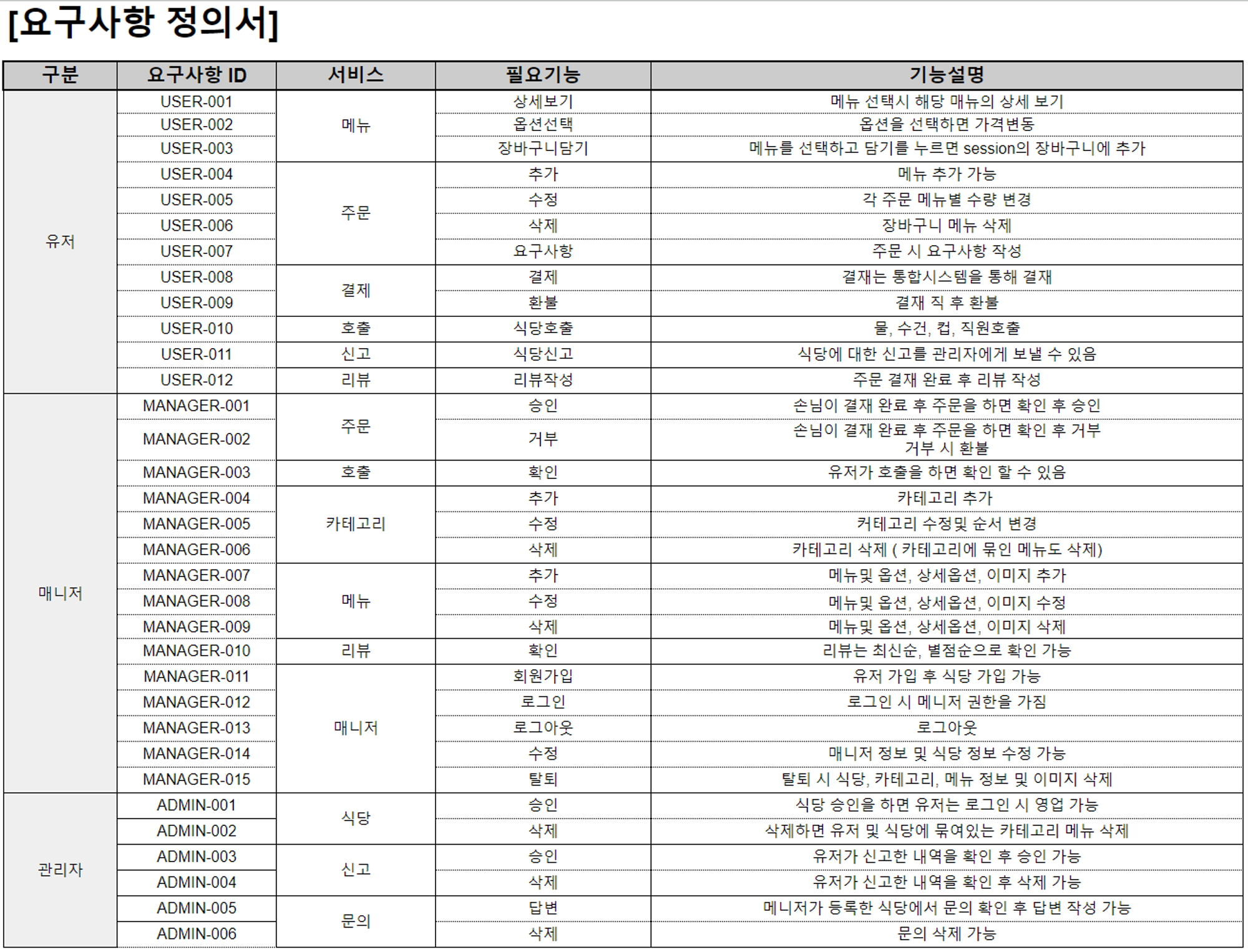
요구사항 정의서 [요구사항 정의서] 구분,요구사항 ID,서비스,필요기능,기능설명 유저,USER-001,메뉴,상세보기,메뉴 선택시 해당 매뉴의 상세 보기 USER-002,옵션선택,옵션을 선택하면 가격변동 USER-00

docs.google.com

요구사항정의서

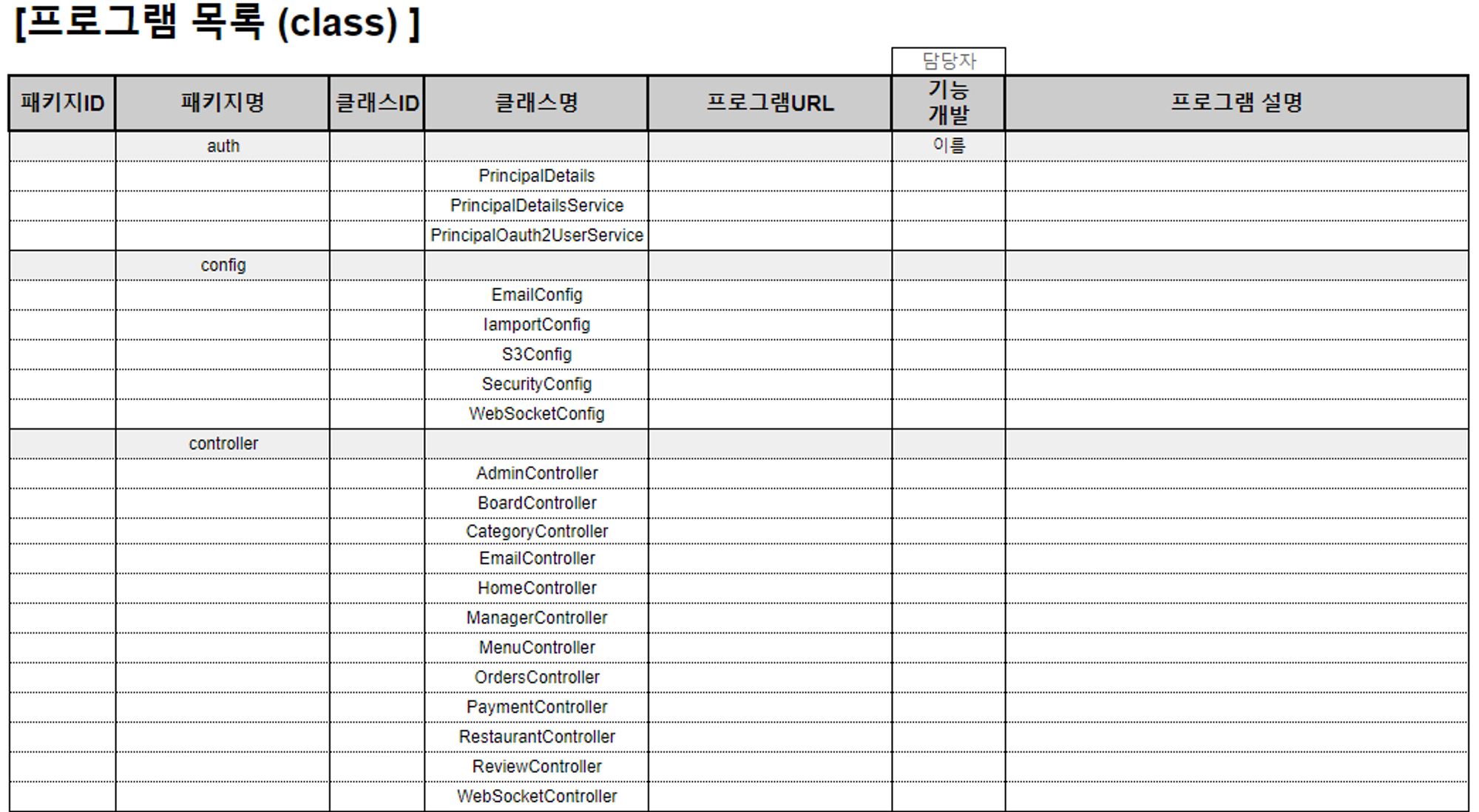
프로그램목록/Class

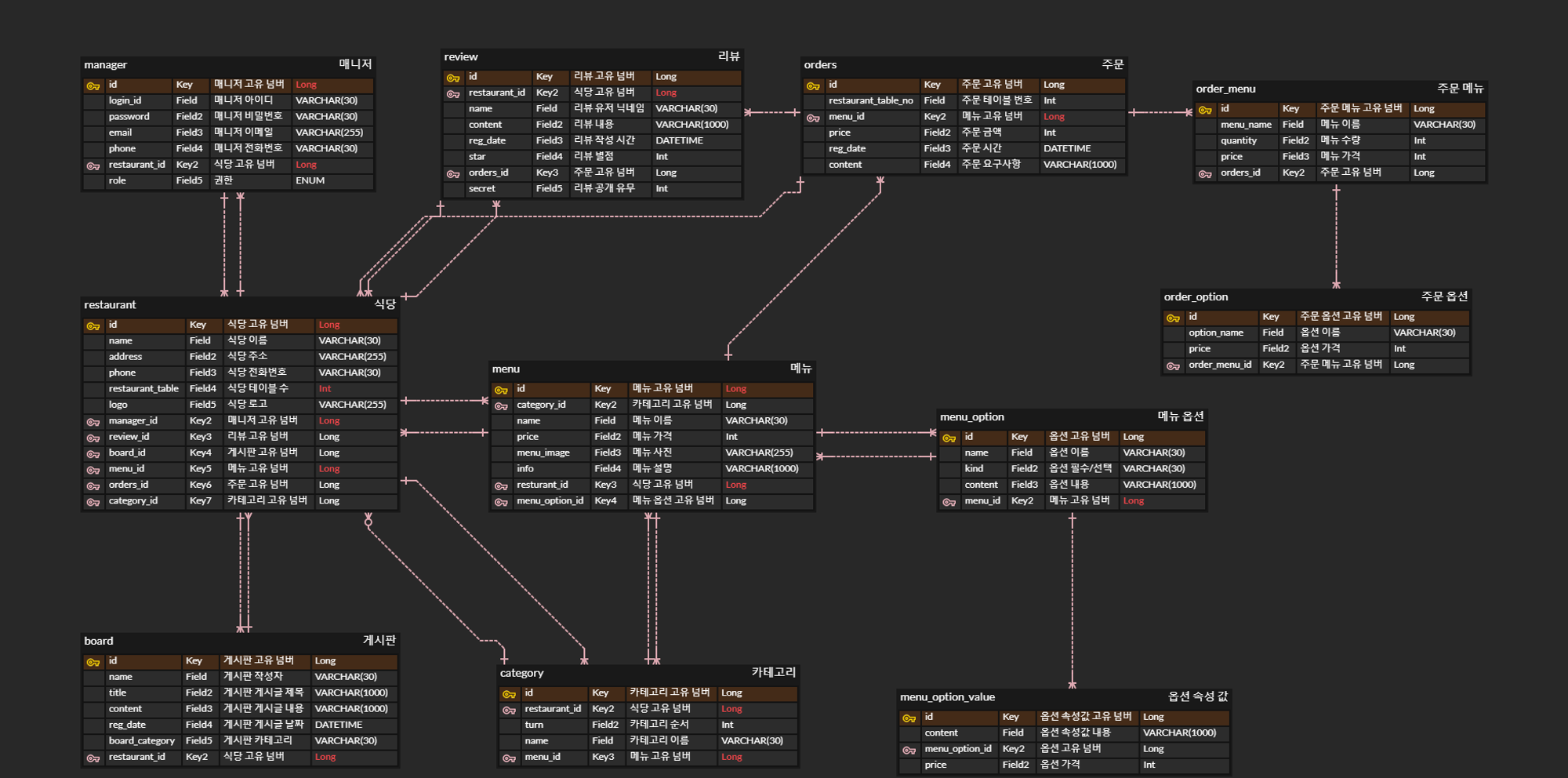
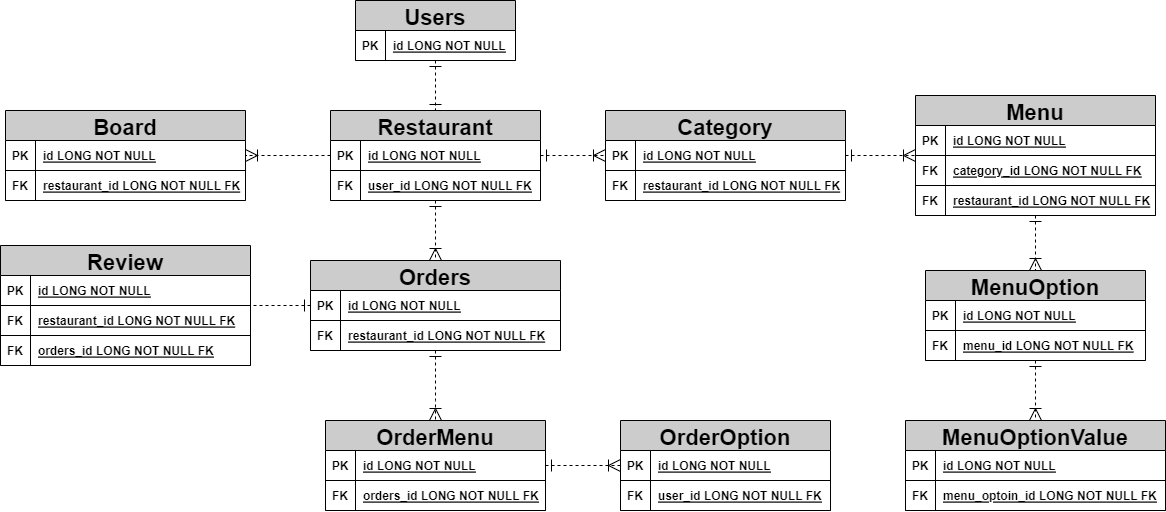
database ERD 다이어그램


정보구조도

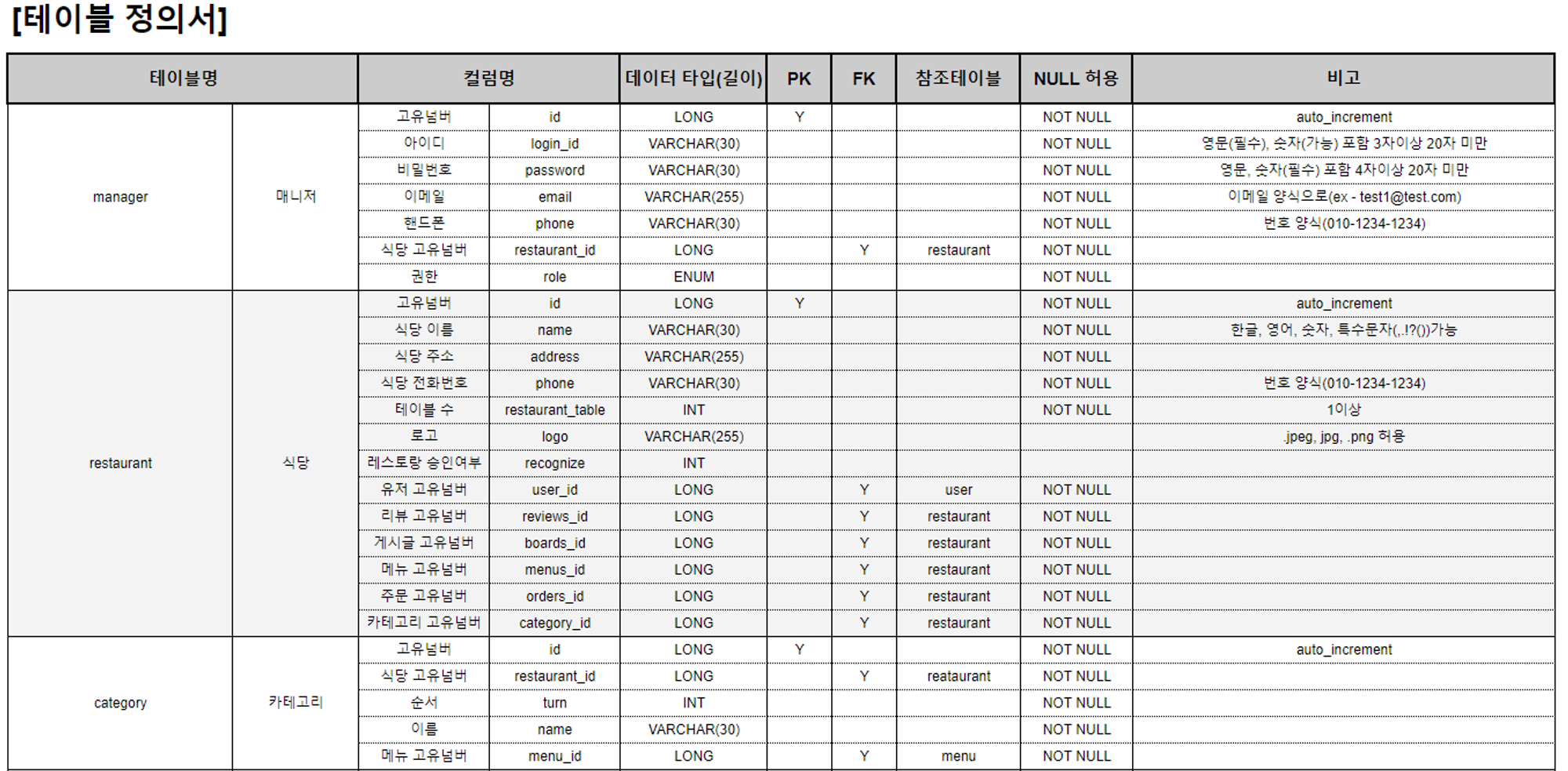
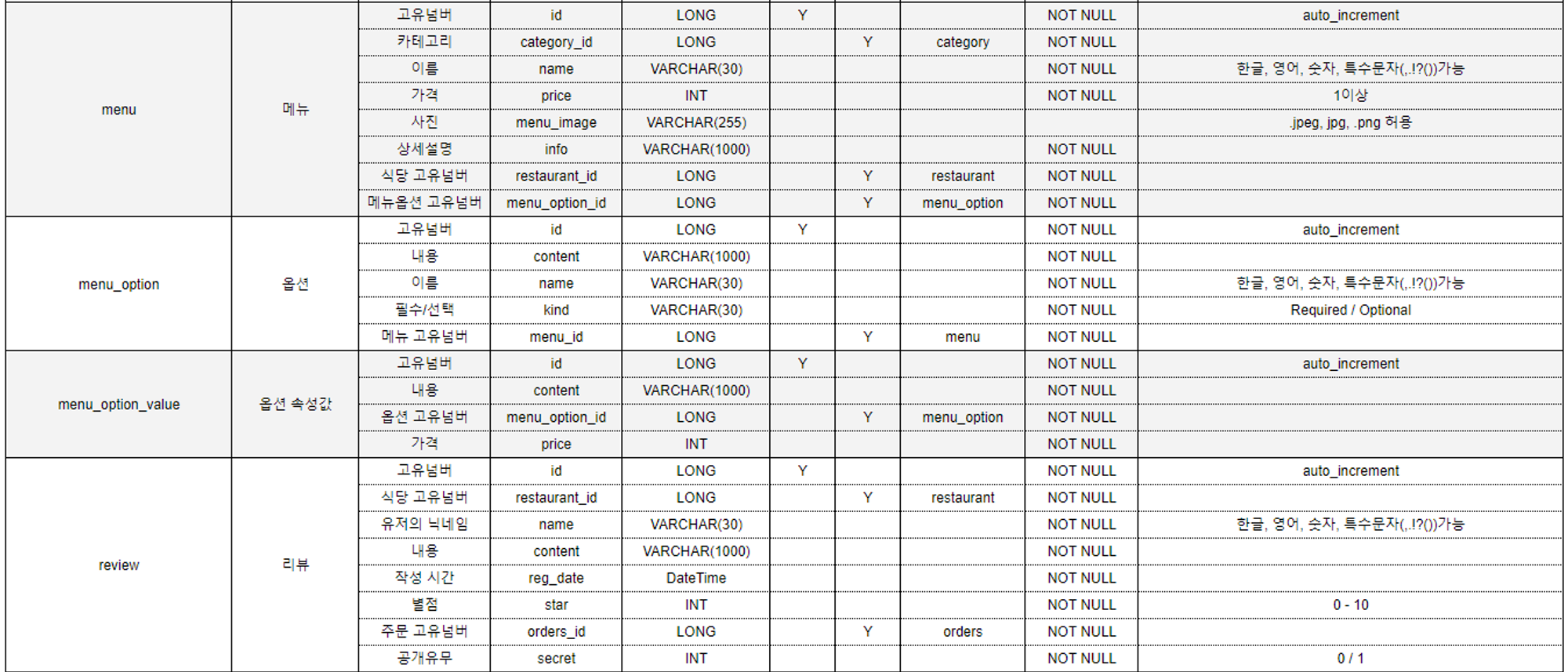
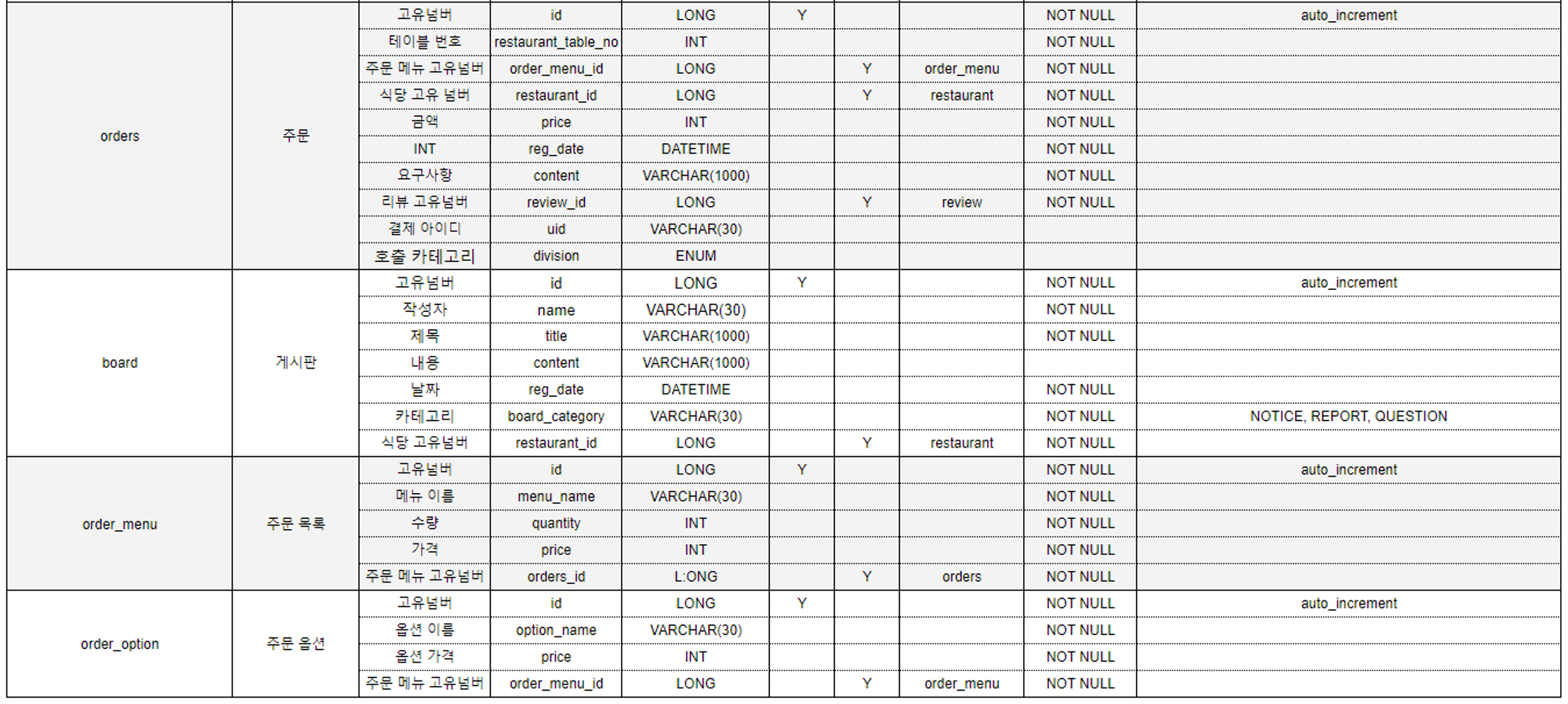
테이블정의서

      •  

'공부 > Project' 카테고리의 다른 글

[JSP/SQL] 프로젝트 EYEVEL  (0) 2024.03.25
[HTTP/CSS/Java Script] Project Momizi  (0) 2024.03.24
[JAVA] 스도쿠 만들기 (Swing)  (0) 2024.03.20

에러 페이지와 


최종 테스트 qr 페이지


버그수정


에러 페이지

java

package kr.ganjuproject.controller;

import jakarta.servlet.RequestDispatcher;
import jakarta.servlet.http.HttpServletRequest;
import org.springframework.boot.web.servlet.error.ErrorController;
import org.springframework.http.HttpStatus;
import org.springframework.stereotype.Controller;
import org.springframework.ui.Model;
import org.springframework.web.bind.annotation.RequestMapping;

@Controller
public class MyErrorController implements ErrorController {

    @RequestMapping("/error")
    public String handleError(HttpServletRequest request, Model model) {
        Object status = request.getAttribute(RequestDispatcher.ERROR_STATUS_CODE);
        String errorMessage = "알 수 없는 오류가 발생했습니다.";
        int statusCode = 0; // 초기 상태 코드 값 설정

        if (status != null) {
            statusCode = Integer.valueOf(status.toString());

            switch (HttpStatus.valueOf(statusCode)) {
                case NOT_FOUND:
                    errorMessage = "페이지를 찾을 수 없습니다.";
                    break;
                case INTERNAL_SERVER_ERROR:
                    errorMessage = "서버 내부 오류가 발생했습니다.";
                    break;
                case FORBIDDEN:
                    errorMessage = "접근이 금지되었습니다.";
                    break;
                case UNAUTHORIZED:
                    errorMessage = "인증이 필요합니다.";
                    break;
                case BAD_REQUEST:
                    errorMessage = "잘못된 요청입니다.";
                    break;
                case METHOD_NOT_ALLOWED:
                    errorMessage = "허용되지 않는 메소드입니다.";
                    break;
                // 여기에 더 많은 오류 상태를 추가할 수 있습니다.
                default:
                    errorMessage = "예기치 못한 오류가 발생했습니다.";
            }
        }

        model.addAttribute("statusCode", statusCode);
        model.addAttribute("errorMessage", errorMessage);

        // 모든 오류를 'error/errorPage.html' 템플릿을 통해 처리
        return "error/errorPage";
    }
}


html

<!DOCTYPE html>
<html xmlns:th="http://www.thymeleaf.org">
<head>
    <meta charset="UTF-8">
    <meta name="viewport" content="width=device-width, initial-scale=1.0">
    <title th:text="${statusCode} + ' 에러'">오류</title>
    <link rel="stylesheet" href="/css/style.css">
    <link rel="stylesheet" href="/css/home/home.css">
    <style>
        h1, .button.home{
           margin: 30px 0;
        }
    </style>
</head>
<body>
<div class="innerBox">
    <div class="container">
        <div class="logo"><img src="/images/logo.svg" alt="logo"></div>
        <h1 th:text="${statusCode} + ' 에러'">오류 제목</h1>
        <p th:text="${errorMessage}">오류 메시지</p>
        <a th:href="@{/}" class="button home">홈으로 돌아가기</a>
    </div>
</div>
</body>
</html>

3주가 넘는 일정이지만 개인 사정이 생겨 길게 못한게 아쉬운


시간이 남을것 같아서 미니게임 하나 넣을까 했는데


기본 기능에 버그수정만으로 벅찬


이날은 간단한 중복클릭 방지와 비동기시 html을 지우고 다시 등록하다보니 이벤트 등록이 제대로 안된 부분들 수정


이래서 함수를 만들어서 쓰나보다 하고 깨닫는 날이었던


// 카테고리 버튼 색상 변경 이벤트
function setActiveCategory() {
    const categories = document.querySelectorAll('.category');
    const menuContainers = document.querySelectorAll('.menu-category');

    let currentActiveIndex = 0;
    menuContainers.forEach((container, index) => {
        const containerTop = container.getBoundingClientRect().top;
        if (containerTop - window.innerHeight / 2 < 0) {
            currentActiveIndex = index;
        }
    });
    categories.forEach((category, index) => {
        if (index === currentActiveIndex) {
            category.classList.add('active');
            ensureCategoryVisible(category);
        } else {
            category.classList.remove('active');
        }
    });
    // 카테고리 클릭 이벤트
    categories.forEach(category => {
        category.addEventListener('click', categoryClickListener);
    });
}

// 클릭한 카테고리가 화면에 완전히 보이지 않을 경우 스크롤
function ensureCategoryVisible(category) {
    const categoryRect = category.getBoundingClientRect();
    const containerRect = categoryContent.getBoundingClientRect();

    if (categoryRect.left < containerRect.left) {
        // 카테고리 버튼이 뷰포트 왼쪽 밖에 위치한 경우
        categoryContent.scrollLeft -= (containerRect.left - categoryRect.left) + 20; // 여백 추가
    } else if (categoryRect.right > containerRect.right) {
        // 카테고리 버튼이 뷰포트 오른쪽 밖에 위치한 경우
        categoryContent.scrollLeft += (categoryRect.right - containerRect.right) + 20; // 여백 추가
    }
}

// 카테고리 클릭 리스너를 위한 분리된 함수
let categoryBtn = true;
function categoryClickListener(e) {

    if(categoryBtn) {
        const targetId = e.currentTarget.getAttribute('data-target');
        const targetElement = document.getElementById(targetId);

        if (targetElement) {
            // category-content의 높이를 가져옵니다.
            const categoryContentHeight = document.querySelector('.category-content').offsetHeight;

            // targetElement까지의 절대 위치를 계산합니다.
            const elementPosition = targetElement.getBoundingClientRect().top + window.pageYOffset;

            // category-content의 높이만큼 위치를 조정합니다.
            const offsetPosition = elementPosition - categoryContentHeight;

            // 계산된 위치로 스크롤합니다.
            window.scrollTo({
                top: offsetPosition,
                behavior: "smooth"
            });
        }
        // 현재 클릭된 카테고리가 화면에 완전히 보이도록 스크롤 조정
        ensureCategoryVisible(e.currentTarget); // 여기서 this는 현재 클릭된 카테고리 요소입니다.

        categoryBtn = false;
        setTimeout( ()=>{
            categoryBtn = true;
        }, 1000);
    }
}


이런식으로 메서드로 묶어두고 지워지고 다시 만들 때마다 이벤트 등록


그리고 ppt 관련 준비를 한


화면 흐름도나


ER 다이어그램같은


것이나 


발표준비같은 짧은 작업을 함


팀장은 아니라 개인 구현 부분만 발표를 했는데


이 부분인데 생각보다 설명을 잘못하고 빼먹은것도 많아 수정할건 수정하고 대본을 만들어 리허설이 필요해 보였음

모바일에서 결재를 하려니 페이지 연결이나 콜백이 달라 구현

m_redirect_url: "http://localhost:8081/payment/verify" // 모바일 결제 후 리디렉션될 URL


pc 처럼 json으로 가격이나 uid나 다른 정보를 받아 오는게 아니고

get 방식으로 uid만 받아와서 이걸 또 iamport에 보내서 토큰 발급 받고 결재 금액 받아오고 검증하고 하는 절차가 따로 필요


PaymentController.java - 여기서 uid값을 일단 받고 session에 저장해둔 가격과 요구사항도 받아올 수 있음

    @GetMapping("/payment/verify")
    public String  verifyPayment(@RequestParam("imp_uid") String impUid, HttpSession session) throws IOException {
        // 세션에서 저장된 데이터 가져오기
        int totalPrice = (int) session.getAttribute("totalPrice");
        log.info("impUid = " + impUid);

        // 결제 검증 로직 수행
        boolean isPaymentValid = paymentService.verifyPayment(impUid, totalPrice);

        if (isPaymentValid) {        // 주문 생성 메서드 호출

            // 결제 검증 성공 시, 주문 생성 로직 수행
            PaymentValidationRequest validationRequest = new PaymentValidationRequest();
            validationRequest.setImpUid(impUid);

            OrderResponseDTO orderResponse = createOrders(validationRequest, session);
            messagingTemplate.convertAndSend("/topic/calls", orderResponse);
            return "redirect:/menu/order/" +orderResponse.getId();
        } else {
            // 결제 검증 실패 시, 결제 실패 페이지로 리디렉션
            return "redirect:/menu/main";
        }
    }


원래는 gson을 쓰다가 배포시에 버전관련 문제로 꼬여서 삭제하고 jackson 방식으로 변경


PaymentService.java -  이 부분에서 uid값과 토큰값을 받아 결재된 가격과 db 가격이 같은지 확인


그리고 getAccessToken()에서 yml에 저장해둔 api 키와 uid를 통해 토큰값을 받아온다

package kr.ganjuproject.service;

import com.fasterxml.jackson.databind.JsonNode;
import com.fasterxml.jackson.databind.ObjectMapper;
import kr.ganjuproject.config.IamportConfig;
import kr.ganjuproject.dto.IamportDTO;
import lombok.RequiredArgsConstructor;
import lombok.extern.slf4j.Slf4j;
import org.springframework.http.*;
import org.springframework.stereotype.Service;
import org.springframework.web.client.RestTemplate;

import java.io.*;
import java.net.HttpURLConnection;
import java.net.URL;
import java.util.Collections;
import java.util.Map;

@Service
@Slf4j
@RequiredArgsConstructor
public class PaymentService {

    private final IamportConfig iamportConfig;
    private final ObjectMapper objectMapper; // ObjectMapper 인스턴스 주입

    // 인증 토큰 발급 받기
    public String getAccessToken() throws IOException {
        IamportDTO iDTO = iamportConfig.iamport();
        URL url = new URL("https://api.iamport.kr/users/getToken");
        HttpURLConnection conn = (HttpURLConnection) url.openConnection();

        conn.setRequestMethod("POST");
        conn.setRequestProperty("Content-Type", "application/json");
        conn.setDoOutput(true);

        // JSON 객체 생성 및 데이터 추가
        String jsonInputString = objectMapper.writeValueAsString(Map.of(
                "imp_key", iDTO.getApikey(),
                "imp_secret", iDTO.getSecret()
        ));

        try (OutputStream os = conn.getOutputStream()) {
            byte[] input = jsonInputString.getBytes("utf-8");
            os.write(input, 0, input.length);
        }

        try (BufferedReader br = new BufferedReader(
                new InputStreamReader(conn.getInputStream(), "utf-8"))) {
            StringBuilder response = new StringBuilder();
            String responseLine;
            while ((responseLine = br.readLine()) != null) {
                response.append(responseLine.trim());
            }
            JsonNode jsonNode = objectMapper.readTree(response.toString());
            String accessToken = jsonNode.path("response").path("access_token").asText();
            return accessToken;
        }
    }

    public boolean verifyPayment(String impUid, int totalPrice) throws IOException {
        String accessToken = getAccessToken();
        RestTemplate restTemplate = new RestTemplate();
        String url = "https://api.iamport.kr/payments/" + impUid;

        HttpHeaders headers = new HttpHeaders();
        headers.setBearerAuth(accessToken);
        headers.setAccept(Collections.singletonList(MediaType.APPLICATION_JSON));

        HttpEntity<String> entity = new HttpEntity<>("parameters", headers);
        ResponseEntity<String> response = restTemplate.exchange(url, HttpMethod.GET, entity, String.class);

        JsonNode responseObject = objectMapper.readTree(response.getBody());
        JsonNode responsePayment = responseObject.path("response");
        int paidAmount = responsePayment.path("amount").asInt();

        return paidAmount == totalPrice;
    }
}


그리고 환불 절차를 httpUrlConnection 방식으로 바꿈

다른방식 쓰다가 자꾸 간혈적으로 실패가 되서 바꾼 뒤로는 환불 잘 됨

환불이 되면 db 에서 order 를 삭제하고 식당 메니저에게 삭제 했다는 메시지를 날림

    // 환불 처리
    public Map<String, Object> requestRefund(Orders order, String reason, String accessToken) {
        try {
            URL url = new URL("https://api.iamport.kr/payments/cancel");
            HttpsURLConnection connection = (HttpsURLConnection) url.openConnection();

            // HTTP 메서드 설정
            connection.setRequestMethod("POST");

            // 헤더 설정
            connection.setRequestProperty("Content-Type", "application/json");
            connection.setRequestProperty("Authorization", accessToken);

            // 요청 본문 전송을 위해 출력 가능으로 설정
            connection.setDoOutput(true);

            // 요청 본문 구성
            String jsonInputString = "{\"imp_uid\": \"" + order.getUid() + "\", \"reason\": \"" + reason + "\"}";

            // 요청 본문 전송
            try (OutputStream os = connection.getOutputStream()) {
                byte[] input = jsonInputString.getBytes(StandardCharsets.UTF_8);
                os.write(input, 0, input.length);
            }

            // 응답 수신
            int responseCode = connection.getResponseCode();
            System.out.println("POST Response Code :: " + responseCode);

            if (responseCode == HttpURLConnection.HTTP_OK) { // 성공적인 응답 처리
                System.out.println("성공");
                ordersService.deleteOrder(order.getId());
                // 응답 본문을 JSON 객체로 파싱하고 필요한 정보를 추출/가공하여 반환
                OrderResponseDTO dto = ordersService.convertToOrderResponseDTO(order);

                messagingTemplate.convertAndSend("/topic/calls", order.getUid());
                return Map.of("success", true);
            } else {
                System.out.println("POST request not worked");
                // 오류 처리
                return Map.of("success", false);
            }
        } catch (Exception e) {
            e.printStackTrace();
            return Map.of("error", e.getMessage());
        }
    }


결제 환불 및 헤더 부분 구현


유저의 어떤 페이지에서도 home과 장바구니로 가는 버튼을 만들고

결제 오류시 환불이나 주문쪽에서 환불을 할 수 있게 구현

환불처리 완료

그리고 header 부분 추가

관련 코드

bodyHEader.html

<!DOCTYPE html>
<html lang="en" xmlns:th="http://www.thymeleaf.org">
<head>
    <meta charset="UTF-8">
    <title>Title</title>
</head>
<body>
<header th:fragment="bodyHeader(args)">
    <div>
        <a class="icon home-icon" th:if="${args.showIcon}" href='/menu/main'>
            <i class="fas fa-home"></i>
        </a>
    </div>
    <p th:text="${args.name}" class="center-text"></p>
    <div>
        <a class="icon cart-icon" th:if="${args.showBasket}" href='/menu/cart'>
            <i class="fas fa-shopping-cart"></i>
            <!-- 주문 개수 뱃지 -->
            <span class="cart-badge" th:if="${session.orders != null and #lists.size(session.orders) > 0}" th:text="${#lists.size(session.orders)}"></span>
        </a>
    </div>
</header>
</body>
</html>


style.css 에 헤더 부분 스타일 추가

/* menu 쪽 전체에서 아이콘 관련 */
.cart-icon {
       position: relative;
       display: inline-block;
   }
.cart-badge {
    position: absolute;
    top: -10px;
    right: -10px;
    padding: 2px 6px;
    border-radius: 50%;
    background: red;
    color: white;
    font-size: 12px;
}


그리고 환불 ( orderId값을 들고 와야 한다)

order.js

// 환불처리 스크립트
document.getElementById('refundButton').addEventListener('click', function() {
    const restaurantName = document.querySelector('.restaurant-name');
    const orderId = restaurantName.dataset.orderId;
    if (confirm('정말로 환불하시겠습니까?')) {
        fetch('/validRefund', {
            method: 'POST',
            headers: {
                'Content-Type': 'application/json',
            },
            body: JSON.stringify({
                orderId: orderId, // 서버 사이드에서 전달받은 주문 ID
            }),
        })
            .then(response => response.json())
            .then(data => {
                console.log(data.success);
                if (data.success) {
                    alert('환불 처리가 완료되었습니다.');
                    location.href = "/menu/main";

                    // 환불 처리 후 페이지 리디렉션 또는 UI 업데이트
                } else {
                    alert('환불 처리에 실패했습니다.');
                }
            })
            .catch(error => {
                console.error('Error:', error);
                alert('서버와의 통신 중 문제가 발생했습니다.');
            });
    }
});


PaymentController.java부분 ( 결제 관련은 menu와 orders에서 많이 옴김

    // 비동기 환불처리
    @PostMapping("/validRefund")
    public ResponseEntity<?> refundOrder(@RequestBody Map<String, Object> payload) throws IOException {
        String reason = "테스트용"; // 환불 사유
        Long orderId = Long.valueOf((String) payload.get("orderId"));

        Orders order = ordersService.findById(orderId).get();

        System.out.println("order" + order);
        String accessToken = refundService.getAccessToken();
        Map<String, Object> refundResult = refundService.requestRefund(order.getUid(), reason, accessToken);

        System.out.println("refundResult" + refundResult);
        System.out.println("order" + order);

        // "success" 키의 값이 true인지 확인하여 성공 여부를 판단
        Boolean success = (Boolean) refundResult.get("success");
        if (Boolean.TRUE.equals(success)) { // 성공 여부 확인
            return ResponseEntity.ok().body(Map.of("success", true, "message", "환불 처리가 완료되었습니다."));
        } else {
            return ResponseEntity.badRequest().body(Map.of("success", false, "message", "환불 처리에 실패했습니다."));
        }
    }


검증 부분 - 토큰값 받아오고 맞으면 환불하고 db 삭제

PaymentService.java

package kr.ganjuproject.service;

import com.fasterxml.jackson.databind.JsonNode;
import com.fasterxml.jackson.databind.ObjectMapper;
import kr.ganjuproject.config.IamportConfig;
import kr.ganjuproject.dto.IamportDTO;
import lombok.RequiredArgsConstructor;
import lombok.extern.slf4j.Slf4j;
import org.springframework.http.*;
import org.springframework.stereotype.Service;
import org.springframework.web.client.RestTemplate;

import java.io.*;
import java.net.HttpURLConnection;
import java.net.URL;
import java.util.Collections;
import java.util.Map;

@Service
@Slf4j
@RequiredArgsConstructor
public class PaymentService {

    private final IamportConfig iamportConfig;
    private final ObjectMapper objectMapper; // ObjectMapper 인스턴스 주입

    // 인증 토큰 발급 받기
    public String getAccessToken() throws IOException {
        IamportDTO iDTO = iamportConfig.iamport();
        URL url = new URL("<https://api.iamport.kr/users/getToken>");
        HttpURLConnection conn = (HttpURLConnection) url.openConnection();

        conn.setRequestMethod("POST");
        conn.setRequestProperty("Content-Type", "application/json");
        conn.setDoOutput(true);

        // JSON 객체 생성 및 데이터 추가
        String jsonInputString = objectMapper.writeValueAsString(Map.of(
                "imp_key", iDTO.getApikey(),
                "imp_secret", iDTO.getSecret()
        ));

        try (OutputStream os = conn.getOutputStream()) {
            byte[] input = jsonInputString.getBytes("utf-8");
            os.write(input, 0, input.length);
        }

        try (BufferedReader br = new BufferedReader(
                new InputStreamReader(conn.getInputStream(), "utf-8"))) {
            StringBuilder response = new StringBuilder();
            String responseLine;
            while ((responseLine = br.readLine()) != null) {
                response.append(responseLine.trim());
            }
            JsonNode jsonNode = objectMapper.readTree(response.toString());
            String accessToken = jsonNode.path("response").path("access_token").asText();
            return accessToken;
        }
    }

    public boolean verifyPayment(String impUid, int totalPrice) throws IOException {
        String accessToken = getAccessToken();
        RestTemplate restTemplate = new RestTemplate();
        String url = "<https://api.iamport.kr/payments/>" + impUid;

        HttpHeaders headers = new HttpHeaders();
        headers.setBearerAuth(accessToken);
        headers.setAccept(Collections.singletonList(MediaType.APPLICATION_JSON));

        HttpEntity entity = new HttpEntity<>("parameters", headers);
        ResponseEntity response = restTemplate.exchange(url, HttpMethod.GET, entity, String.class);

        JsonNode responseObject = objectMapper.readTree(response.getBody());
        JsonNode responsePayment = responseObject.path("response");
        int paidAmount = responsePayment.path("amount").asInt();

        return paidAmount == totalPrice;
    }
}

웹소켓을 이용한 호출과 주문

  1. 웹소켓 의존성 추가

bulid.gradle에 추가

implementation 'org.springframework.boot:spring-boot-starter-websocket'
  1. WebSocketConfig에 설정 추가 - 일단 테스트로 내 컴퓨터 ip를 넣어둠
package kr.ganjuproject.config;

import org.springframework.context.annotation.Configuration;
import org.springframework.messaging.simp.config.MessageBrokerRegistry;
import org.springframework.web.socket.config.annotation.EnableWebSocketMessageBroker;
import org.springframework.web.socket.config.annotation.StompEndpointRegistry;
import org.springframework.web.socket.config.annotation.WebSocketMessageBrokerConfigurer;

@Configuration
@EnableWebSocketMessageBroker
public class WebSocketConfig implements WebSocketMessageBrokerConfigurer {

    @Override
    public void configureMessageBroker(MessageBrokerRegistry config) {
        config.enableSimpleBroker("/topic");
        config.setApplicationDestinationPrefixes("/app");
    }
    @Override
    public void registerStompEndpoints(StompEndpointRegistry registry) {
        registry.addEndpoint("/ws")
                .setAllowedOrigins("<http://192.168.10.28> :8081")
                .withSockJS();
    }
}
  1. Controller에 처리 로직 추가 - 테스트로 db에 값 넣어보고 전
package kr.ganjuproject.controller;

import kr.ganjuproject.entity.Orders;
import kr.ganjuproject.service.OrdersService;
import lombok.RequiredArgsConstructor;
import org.springframework.messaging.handler.annotation.MessageMapping;
import org.springframework.messaging.handler.annotation.SendTo;
import org.springframework.stereotype.Controller;

@Controller
@RequiredArgsConstructor
public class WebSocketController {

    private final OrdersService ordersService;

    @MessageMapping("/call")
    @SendTo("/topic/calls")
    public Orders call(Orders order) throws Exception {
        // 처리 로직
        ordersService.add(order);
        return order;
    }
}

  1. 보내는페이지 받는 페이지 전부 웹소켓 관련 스크립트 참조
  1. 이제 호출하기에서 클릭 했을 때 값을 받아서 웹소켓을 통해 보내줌
// 호출하기 모달에서 호출하기 버튼 클릭 이벤트
document.getElementById('submitCall').addEventListener('click', () => {
    // 실제 애플리케이션에서는 이곳에 선택된 옵션을 처리하는 로직을 구현합니다.
    const selectedOption = document.querySelector('input[name="callOption"]:checked').value;
    console.log('호출 옵션:', selectedOption);

    // WebSocket을 통해 서버로 선택된 옵션 정보 전송
    fetch('/validUserCall', {
        method: 'POST',
        headers: {
            'Content-Type': 'application/json',
        },
        body: selectedOption,
    })
        .then(response => response.json())
        .then(data => {
            // fetch 성공 후, 저장된 주문 정보를 WebSocket을 통해 전송
            if (window.stompClient && window.stompClient.connected) {
                const orderInfo = {
                    id: data.order.id, // 저장된 주문 ID
                    content: data.order.content, // 호출 내용
                    restaurantTableNo: data.order.restaurantTableNo, // 테이블 번호
                    regDate: data.order.regDate, // 등록 날짜
                    division: data.order.division, // 호출인가?
                    restaurantId: data.order.restaurantId
                };

                console.log(orderInfo);
                stompClient.send("/app/calls", {}, JSON.stringify(orderInfo));
            }
            console.log("성공");
        })
        .catch((error) => {
            console.error('Error:', error);
        });

    document.getElementById('callModal').style.display = 'none'; // 모달 닫기
    document.body.style.overflow = ''; // 스크롤 활성화
});
  1. controller 측에서 db에 저장해 entity를 만든 다음에 json으로 가져와서 보내줌
    // 호출하기에서 값을 가져와서 orders에 저장하고 다시 orders로 내보냄
    @PostMapping("/validUserCall")
    public ResponseEntity<?> save(HttpSession session, @RequestBody String content){
        long restaurantId = (long) session.getAttribute("restaurantId");
        int restaurantTableNo = (int) session.getAttribute("restaurantTableNo");
        Orders order = new Orders();
        order.setRestaurantTableNo(restaurantTableNo);
        order.setPrice(0);
        order.setRegDate(LocalDateTime.now());
        order.setRestaurant(restaurantService.findById(restaurantId).get());
        order.setContent(content);
        order.setDivision(RoleOrders.CALL);

        Orders saveOrder = ordersService.save(order);

        // Orders 엔티티를 OrderResponseDTO로 변환
        OrderResponseDTO orderResponseDTO = ordersService.convertToOrderResponseDTO(saveOrder);
        System.out.println(orderResponseDTO);
        System.out.println("저장성공");
        return ResponseEntity.ok().body(Map.of("order", orderResponseDTO));
    }
  1. 통신을 하려면 스크립트 측에서 실시간 감지하는 로직이 필요, 페이지 전체를 관장하는 js 부분에 추가
// 초기화 코드는 페이지 로드 시 한 번만 실행
const socket = new SockJS('/ws');
const stompClient = Stomp.over(socket);

// home.js에서 메시지 처리를 위한 함수를 전역으로 선언
window.handleReceivedCall = function(message) {
    // 추가적인 메시지 처리 로직...
};

stompClient.connect({}, function(frame) {
    console.log('Connected: ' + frame);
    stompClient.subscribe('/topic/calls', function(callMessage) {
        var callInfo = JSON.parse(callMessage.body);
        // 전역으로 선언된 메시지 처리 함수를 호출
        window.handleReceivedCall(callInfo);
    });
});

// 전역 변수로 설정하여 페이지 전체에서 사용 가능
window.stompClient = stompClient;
  1. 받는 쪽에도 해볼까
// order.js에서는 home.js에서 선언한 함수를 활용하여 메시지를 처리
if (window.handleReceivedCall) {
    // 기존의 handleReceivedCall 함수를 백업
    const originalHandleReceivedCall = window.handleReceivedCall;

    // handleReceivedCall 함수 확장
    window.handleReceivedCall = function(callInfo) {
        // 기존 로직 호출
        originalHandleReceivedCall(callInfo);

        // order.js에서 추가 로직 구현
        console.log("order.js:", callInfo);
        // 예: 화면에 메시지를 표시하는 로직
    }
}

성공

개인적인 사정으로 5일간 참여를 못해서 오늘은 좀 달림


일단 info에서 cart로 넘어오는것까지는 했었는데 버튼에 총 금액 부분 안되서 그거 수정하고


그다음에 결재를 하고 orders 에 저장하는 부분에서 생각보다 복잡해


orderMenu와 orderOption라는 엔티티도 추가되고 리뷰작성도 구현함


그리고 페이지에서 값을 받아오는 DTO들도 여럿 생성


처리 순서대로 코드 작성


menu의 main에서 메뉴를 클릭 하면 그 메뉴에 묶인 옵션값이 있다면 같이 가져와서 뿌리는 것 까지는 저번주에 했고 이 값을 cart에 싣기전에 session에 저장하고 id값을 기반으로 데이터를 가져와 뿌림


info.js 

이 부분에서 일단 비동기로 id값들을 controller에 전달하고 controller에서 값을 session에 잘 저장하면 다시 와서 cart로 감

function infosubmit(form) {
    const selectedOptions = collectSelectedOptions();
    const quantity = document.getElementById('order-num').innerText;
    const menuId = form.menuId.value;

    // JSON 형태로 서버에 데이터 전송
    fetch('/menu/info', {
        method: 'POST',
        headers: {
            'Content-Type': 'application/json',
        },
        body: JSON.stringify({
            menuId: menuId,
            selectedOptions: selectedOptions,
            quantity: quantity,
        }),
    })
        .then(response => response.json())
        .then(data => {
            console.log('Success:', data);
            // 성공적으로 처리되었을 때의 로직
            window.location.href = "/menu/cart";
        })
        .catch((error) => {
            console.error('Error:', error);
            // 에러 처리 로직
            alert('처리 중 에러가 발생했습니다. 메인 화면으로 이동합니다.');
            // 메인 화면으로 리디렉션
            window.location.href = "/menu/main";
        });

    // 기본 폼 제출 방지
    event.preventDefault();
}


MenuController.java - info의 post매핑 비동기 처리 부분


위의 info에서 비동기로 와서 session에 리스트로 추가를 하고 json형식으로 메시지 반환

    // 메뉴 상세 정보 창
    @PostMapping("/info")
    public ResponseEntity<?> info(@RequestBody OrderDTO orderDTO, HttpSession session) {

        System.out.println(orderDTO);
        // 세션에서 주문 리스트를 가져옴. 없으면 새 리스트를 생성.
        List<OrderDTO> orders = (List<OrderDTO>) session.getAttribute("orders");
        if (orders == null) {
            orders = new ArrayList<>();
        }

        // 현재 주문을 리스트에 추가
        orders.add(orderDTO);

        // 주문 리스트를 세션에 다시 저장
        session.setAttribute("orders", orders);

        // 정상적인 처리 응답을 JSON 형태로 반환
        Map<String, String> response = new HashMap<>();
        response.put("message", "주문이 성공적으로 처리되었습니다.");
        return ResponseEntity.ok(response);
    }


MenuController.java - cart의 get매핑 session에 실린 id값을 검색해서 데이터 가져가는 부분

    // 장바구니 페이지 이동 시 session에 값이 있다면 가지고 감
    @GetMapping("/cart")
    public String cart(HttpSession session, Model model) {
        List<OrderDTO> orders = (List<OrderDTO>) session.getAttribute("orders");
        List<OrderDetails> orderDetailsList = new ArrayList<>();

        for (OrderDTO order : orders) {
            OrderDetails orderDetails = ordersService.getOrderDetails(order);
            orderDetailsList.add(orderDetails);
        }

        model.addAttribute("orderDetailsList", orderDetailsList);

        return "user/cart"; // 장바구니 페이지로 이동
    }


cart.html - 여기서 직접 선택한 옵션과 가격을 보여주고 추가를 하러 메인으로 가거나 결재를 할 수 있음

<!DOCTYPE html>
<html lang="en" xmlns:th="http://www.thymeleaf.org" xmlns:sec="http://www.thymeleaf.org/thymeleaf-extras-springsecurity5">

<head>
    <meta charset="UTF-8">
    <title>장바구니</title>
    <script src="https://cdn.iamport.kr/v1/iamport.js"></script>
    <link href="/css/style.css" rel="stylesheet">
    <link href="/css/user/cart.css" rel="stylesheet" type="text/css">
    <script src="/js/user/cart.js" type="text/javascript" defer></script>
    <script src="/js/user/validate/iamport.js" type="text/javascript" defer></script>
</head>
<body>
<div class="innerBox">
    <header></header>
    <div class="container">
        <div class="restaurant-name">더조은 식당</div>
        <div th:each="orderDetails : ${orderDetailsList}" class="orders"
             th:data-menu-price="${orderDetails.menu.price}"
             th:data-option-price="${orderDetails.getOptionsPriceSum()}"
             th:data-menu-id="${orderDetails.menu.id}">
            <div class="menu">
                <div class="text">
                    <!-- 메뉴 제목 -->
                    <div class="title" th:text="${orderDetails.menu.name}">짜파게티</div>
                    <!-- 메뉴 가격 -->
                    <div class="menu-price" th:text="'가격 : ' + ${orderDetails.menu.price} + '원'">가격 : 5,000원</div>
                    <!-- 옵션 목록 -->
                    <div th:each="optionDetail : ${orderDetails.optionDetailsList}" class="option">
                        <span th:text="${optionDetail.menuOption.content} + ' : ' + ${optionDetail.menuOptionValue.content}
                                  + ' (' + ${optionDetail.menuOptionValue.price} + '원)'">옵션 : 안맵게 해주세요(-3000원)</span>
                    </div>
                    <!-- 총 가격은 서버 사이드에서 계산하거나 클라이언트 사이드에서 자바스크립트로 계산할 수 있습니다 -->
                    <div class="total-price" th:text="'총 가격: ' + ${orderDetails.totalPrice} + '원'">총 가격: ???원</div>
                </div>
            </div>
            <div class="etc">
                <div class="image">
                    <!-- 이미지 경로는 예시입니다. 실제 경로로 변경해야 합니다. -->
                    <img th:src="@{/images/sample.png}" alt="음식 이미지" class="img">
                </div>
                <div class="num">
                    <!-- 수량 조절은 자바스크립트 함수로 구현할 수 있습니다 -->
                    <input type="button" class="minus" value="-">
                    <div class="text" th:text="${orderDetails.quantity}">2</div>
                    <input type="button" class="plus" value="+">
                </div>
            </div>
        </div>
        <div class="menu-plus">
            +메뉴추가
        </div>
        <div class="request">
            <label for="contents" class="title">요청사항</label>
            <textarea class="contents" id="contents" name="contents" placeholder="내용을 입력하세요" rows="4"></textarea>
            <input type="button" class="submit button" onclick="requestPay()" value="주문하기">
        </div>
    </div>
</div>
</body>
</html>


cart.js - 기존에 단순히 숫자 증감만 했다면 이번에는 증감시에 controller에서 비동기로 session 값 갱신

// 숫자 증감

const minus = document.querySelectorAll('.minus');
const plus = document.querySelectorAll('.plus');

// 수량 변경 시 session값을 업데이트
function updateValidSessionQuantity(menuId, newQuantity){
    console.log(menuId);
    console.log(newQuantity);
    // 서버에 수량 변경 요청 보내기
    fetch('/menu/updateValidQuantity',{
        method: 'POST',
        headers: {
            'Content-Type': 'application/json',
        },
        body: JSON.stringify({
            menuId: menuId,
            quantity: newQuantity,
        }),
    })
        .then(response => response.json())
        .then(data => {
            console.log(data);
        })
        .catch((error) => {
            console.error('수량 변경 실패:', error);
        });
}
// 수량 변경 함수
function updateQuantityAndPrice(menuId, textElement, change) {
    const ordersDiv = textElement.closest('.orders');
    const menuPrice = parseInt(ordersDiv.dataset.menuPrice, 10);
    const optionPrice = parseInt(ordersDiv.dataset.optionPrice, 10);
    const totalPriceElement = ordersDiv.querySelector('.total-price');

    // 현재 수량 조절
    let quantity = parseInt(textElement.textContent, 10) + change;
    quantity = Math.max(1, Math.min(quantity, 100)); // 수량은 1 이상 100 이하로 제한
    textElement.textContent = quantity;

    updateValidSessionQuantity(menuId, quantity);

    // 새로운 총 가격 계산
    let newTotalPrice = (menuPrice + optionPrice) * quantity;
    totalPriceElement.textContent = '총 가격: '  + newTotalPrice + '원';

    // 새로운 총 가격 계산 후 전체 주문 가격 업데이트
    updateTotalOrderPrice();
}

// 총 가격 실시간 계산 함수
function updateTotalOrderPrice() {
    const orderDivs = document.querySelectorAll('.orders');
    let totalOrderPrice = 0;

    orderDivs.forEach(div => {
        const quantity = parseInt(div.querySelector('.num .text').textContent, 10);
        const menuPrice = parseInt(div.dataset.menuPrice, 10);
        const optionPrice = parseInt(div.dataset.optionPrice, 10);
        totalOrderPrice += (menuPrice + optionPrice) * quantity;
    });

    // 주문하기 버튼의 값을 업데이트
    const submitButton = document.querySelector('.submit.button');
    submitButton.value = `${totalOrderPrice}원 주문하기`;
}

// 'minus'와 'plus' 버튼에 이벤트 리스너 추가
minus.forEach(button => {
    button.addEventListener('click', () => {
        const text = button.closest('.num').querySelector('.text');
        const menuId = button.closest('.orders').dataset.menuId;
        updateQuantityAndPrice(menuId, text, -1); // 수량 감소
    });
});

plus.forEach(button => {
    button.addEventListener('click', () => {
        const text = button.closest('.num').querySelector('.text');
        const menuId = button.closest('.orders').dataset.menuId;
        updateQuantityAndPrice(menuId, text, 1); // 수량 증가
    });
});

document.addEventListener('DOMContentLoaded', () => {
    updateTotalOrderPrice(); // 페이지 로드 시 전체 주문 가격을 계산하고 버튼에 반영
});


// 메뉴 추가 버튼 클릭 시 메인으로
const menuPlus = document.querySelector(".menu-plus");

menuPlus.addEventListener('click', () =>{
    location.href = '/menu/main';
});


MainController.java 비동기로 수량 증감시 갱신하는 부분

    // cart에서 수량 변경 시 비동기로 업데이트
    @PostMapping("/updateValidQuantity")
    public ResponseEntity<?> updateMenuQuantity(HttpSession session, @RequestBody OrderDTO orderDTO){

        // 세션에서 주문 목록을 가져옴
        List<OrderDTO> orders = (List<OrderDTO>) session.getAttribute("orders");
        if (orders == null) {
            return ResponseEntity.badRequest().body("장바구니가 비어 있습니다.");
        }

        // 메뉴 ID와 일치하는 주문 찾기 및 수량 업데이트
        for (OrderDTO order : orders) {
            System.out.println("order.getMenuId() = " + order.getMenuId());
            System.out.println("MenuID = " + orderDTO.getMenuId());
            System.out.println("Quantity = " + orderDTO.getMenuId());
            if (order.getMenuId() == orderDTO.getMenuId()) {
                order.setQuantity(orderDTO.getQuantity()); // 수량 업데이트
                break; // 메뉴 ID가 일치하는 첫 번째 주문만 업데이트
            }
        }

        // 업데이트된 주문 목록을 세션에 저장
        session.setAttribute("orders", orders);
        System.out.println(orders);
        // 정상적인 처리 응답을 JSON 형태로 반환
        Map<String, String> response = new HashMap<>();
        response.put("data", "수량이 업데이트되었습니다.");
        return ResponseEntity.ok(response);
    }


OrderDTO.java - id값만 묶어서 session에 저장할 때 쓰려고 만든 DTO

package kr.ganjuproject.dto;

import lombok.Data;

import java.util.List;

@Data
public class OrderDTO {
    private Long menuId;
    private List<OptionSelection> selectedOptions;
    private int quantity; // 수량 필드 추가

    @Data
    public static class OptionSelection {
        private Long optionId;
        private Long valueId;
    }
}


iamport.js

결재시 그냥 이름하고 값만 넘기고 결재를 한 다음에 uid값을 받아서 비동기로 저장

// Iamport 결제 라이브러리 초기화
var IMP = window.IMP; // 생략 가능
IMP.init("imp숫자"); // 발급받은 "가맹점 식별코드"를 사용

let menuName;
let totalPayMoney;

function orderContent(){
    // 메뉴 이름(1~n개)하고 총 가격만 불러옴
    const orderList = document.querySelectorAll('.orders');
    let menuNames = [];

    orderList.forEach((order) => {
        // 각 주문에서 메뉴 이름 추출
        const menuName = order.querySelector('.title').textContent;
        menuNames.push(menuName);
    });

    menuName = menuNames[0];

    if(menuNames.length > 1){
        menuName = menuNames[0] + " 외 " + (menuNames.length-1) + "개";
    }

// 총 가격 추출
    const totalPayButton = document.querySelector('.submit.button').value;
    totalPayMoney = totalPayButton.split("원")[0];
}

function requestPay() {
    const contents = document.getElementById('contents');
    orderContent();
    // 결제 정보 준비
    IMP.request_pay({
        pg: "html5_inicis", // PG사
        pay_method: "card", // 결제 수단
        merchant_uid: "order_" + new Date().getTime(), // 주문번호
        name: menuName, // 결제창에서 보여질 이름
        amount: totalPayMoney, // 결제 금액
        // buyer_email: "iamport@siot.do",
        // buyer_name: "구매자이름",
        // buyer_tel: "010-1234-5678", // 구매자 전화번호
        // buyer_addr: "서울특별시 강남구 삼성동",
        // buyer_postcode: "123-456", // 구매자 우편번호
        // m_redirect_url: "/menu/order" // 모바일 결제 후 리디렉션될 URL
    }, function (rsp) {
        console.log(rsp);
        if (rsp.success) {
            // 결제 성공 시 로직
            fetch("/menu/validImpUid", {
                method: "POST",
                headers: {
                    "Content-Type": "application/json",
                },
                body: JSON.stringify({
                    "impUid": rsp.imp_uid, // Iamport 결제 고유 번호
                    "contents": contents.value, // 요청사항
                    "totalPrice": totalPayMoney
                }),
            })
                .then(response => response.json())
                .then(data => {
                    console.log(data);
                    // 서버에서 결제 검증 성공 후 리디렉션할 페이지로 이동
                    location.href = "/menu/order/" + data.orderId;
                })
                .catch(error => {
                    // 오류 처리 로직
                    alert("결제 검증에 실패했습니다. 다시 시도해주세요.");
                });
        } else {
            // 결제 실패 시 로직,
            alert("결제에 실패하였습니다. 에러 내용: " + rsp.error_msg);
        }
    });
}


menuController.java

결제 성공 시 데이터 저장 부분

이 부분 때문에 좀 저장 방식이 복잡해서 엔티티 두개 추가

 @PostMapping("/validImpUid")
    public ResponseEntity<?> order(@RequestBody PaymentValidationRequest validationRequest, HttpSession session) {
        // 세션에서 주문 정보 및 관련 정보 가져오기
        Long restaurantId = (Long)session.getAttribute("restaurantId");
        int restaurantTableNo = (int)session.getAttribute("restaurantTableNo");
        List<OrderDTO> ordersDTO = (List<OrderDTO>) session.getAttribute("orders");

        if (ordersDTO == null) {
            return ResponseEntity.status(HttpStatus.BAD_REQUEST).body("주문 정보가 없습니다.");
        }

        Orders newOrder = new Orders();
        newOrder.setRestaurantTableNo(restaurantTableNo);
        newOrder.setRestaurant(restaurantService.findById(restaurantId).orElseThrow(() -> new RuntimeException("Restaurant not found")));
        newOrder.setPrice(validationRequest.getTotalPrice());
        newOrder.setRegDate(LocalDateTime.now());
        newOrder.setContent(validationRequest.getContents());
        newOrder.setUid(validationRequest.getImpUid());
        newOrder.setDivision(RoleOrders.WAIT);
        List<OrderMenu> orderMenus = new ArrayList<>();

        for (OrderDTO orderDTO : ordersDTO) {
            OrderMenu orderMenu = new OrderMenu();
            orderMenu.setMenuName(menuService.findById(orderDTO.getMenuId()).orElseThrow(() -> new RuntimeException("Menu not found")).getName());
            orderMenu.setQuantity(orderDTO.getQuantity());
            orderMenu.setPrice(menuService.findById(orderDTO.getMenuId()).get().getPrice()); // 기본 가격 설정
            orderMenu.setOrder(newOrder); // 연결된 주문 설정

            List<OrderOption> orderOptions = new ArrayList<>();
            for (OrderDTO.OptionSelection selectedOption : orderDTO.getSelectedOptions()) {
                OrderOption orderOption = new OrderOption();
                MenuOption menuOption = menuOptionService.findById(selectedOption.getOptionId());
                MenuOptionValue menuOptionValue = menuOptionValueService.findById(selectedOption.getValueId());
                orderOption.setOptionName(menuOption.getContent() + ": " + menuOptionValue.getContent());
                orderOption.setPrice(menuOptionValue.getPrice()); // 추가 가격 설정
                orderOption.setOrderMenu(orderMenu); // 연결된 주문 메뉴 설정
                orderOptions.add(orderOption); // 옵션 목록에 추가
            }
            orderMenu.setOrderOptions(orderOptions); // 주문 메뉴에 옵션 설정
            orderMenus.add(orderMenu); // 주문 메뉴 목록에 추가
        }

        newOrder.setOrderMenus(orderMenus); // 주문에 주문 메뉴 목록 설정
        Orders savedOrder = ordersService.add(newOrder); // 주문 저장

        // 정상적인 처리 응답을 JSON 형태로 반환
        Map<String, String> response = new HashMap<>();
        response.put("message", "결제 검증 및 주문 정보 저장 성공.");
        response.put("orderId", savedOrder.getId().toString());
        return ResponseEntity.ok(response);
    }


PaymentValidationRequest.java 이 부분을 따로 만들어서 클래스로 받아옴

package kr.ganjuproject.dto;

import lombok.Data;

//결제 검증 요청 데이터 클래스
@Data
public class PaymentValidationRequest {
    private String impUid; // uid
    private String contents; // 요구사항
    private int totalPrice; // 총 금액
}


수정 및 새로 작성된 entity 부분


orders.java

package kr.ganjuproject.entity;

import jakarta.persistence.*;
import lombok.AllArgsConstructor;
import lombok.Data;
import lombok.NoArgsConstructor;
import lombok.ToString;

import java.time.LocalDateTime;
import java.util.ArrayList;
import java.util.List;

@Entity
@Data
@NoArgsConstructor
@AllArgsConstructor
public class Orders {
    @Id
    @GeneratedValue(strategy = GenerationType.IDENTITY)
    private Long id;
    private int restaurantTableNo;

    @OneToMany(mappedBy = "order", cascade = CascadeType.ALL, orphanRemoval = true)
    private List<OrderMenu> orderMenus = new ArrayList<>();

    @ManyToOne(fetch = FetchType.LAZY)
    @JoinColumn(name = "restaurant_id")
    @ToString.Exclude
    private Restaurant restaurant;
    private int price;
    private LocalDateTime regDate;
    private String content;
    @OneToOne(mappedBy = "order", orphanRemoval = true, cascade = CascadeType.ALL)
    @ToString.Exclude
    private Review review;
    private String uid;
    @Enumerated(EnumType.STRING)
    private RoleOrders division;
}


OrderMenu.java

package kr.ganjuproject.entity;

import jakarta.persistence.*;
import lombok.AllArgsConstructor;
import lombok.Data;
import lombok.NoArgsConstructor;
import lombok.ToString;

import java.util.ArrayList;
import java.util.List;

@Entity
@Data
@NoArgsConstructor
@AllArgsConstructor
public class OrderMenu {
    @Id
    @GeneratedValue(strategy = GenerationType.IDENTITY)
    private Long id;

    private String menuName;
    private int quantity;
    private int price; // 기본 가격 (1개 가격)

    @ManyToOne(fetch = FetchType.LAZY)
    @JoinColumn(name="orders_id")
    @ToString.Exclude
    private Orders order;

    // 총 가격은 계산 필드로, 직접 저장하지 않고 메소드로 계산해서 제공할 수 있음
    @Transient
    public int getTotalPrice() {
        // 옵션 가격을 포함한 총 가격 계산
        int optionPrice = orderOptions.stream().mapToInt(OrderOption::getPrice).sum();
        return (this.price + optionPrice) * this.quantity;
    }

    @OneToMany(mappedBy = "orderMenu", cascade = CascadeType.ALL, orphanRemoval = true)
    @ToString.Exclude
    private List<OrderOption> orderOptions = new ArrayList<>();
}


OrderOption.java

package kr.ganjuproject.entity;

import jakarta.persistence.*;
import lombok.AllArgsConstructor;
import lombok.Data;
import lombok.NoArgsConstructor;

@Entity
@Data
@NoArgsConstructor
@AllArgsConstructor
public class OrderOption {
    @Id
    @GeneratedValue(strategy = GenerationType.IDENTITY)
    private Long id;

    private String optionName; // 옵션 이름
    private int price; // 옵션 추가 가격

    @ManyToOne(fetch = FetchType.LAZY)
    @JoinColumn(name="order_menu_id")
    private OrderMenu orderMenu;
}


이제 남은건 주문을 했을 때 웹소켓으로 메니저에게 정보 넘겨주는 부분


이번에는 더미데이터와 

더미데이터를 추가해서 실제로 데이터를 넘기는 과정을 진행함


더미 데이터 생성 때 참조키나 왜래키가 너무 많아서 작성하는데 좀 애를 먹음


main 에서 값 불러오는 작업은 잘 진행이 됐고


main에서 메뉴를 클릭했을 때 info에 정보를 띄워주는 것도 완료를 함


비동기 일 때 json 때문에 DTO추가해서 작업함


MenuDTO - 참조하던 클래스를 제외한 속성을 가짐

package kr.ganjuproject.dto;

import lombok.Data;

@Data
public class MenuDTO {
    private Long id;
    private String name;
    private Integer price;
    private String menuImage;
    private String info;
    // 메뉴가 속한 카테고리의 ID. 필요에 따라 카테고리 이름 등 추가 정보 포함 가능
    private Long categoryId;
}


CategoryDTO - 마찬가지로 category 엔티티에 있는 클래스를 제외한 값들을 가짐

package kr.ganjuproject.dto;

import lombok.Data;

@Data
public class CategoryDTO {
    private Long id;
    private String name;
    // 카테고리의 순서. 필요에 따라 추가적인 정보 포함 가능
    private Integer turn;
}


BoardDTO - 위랑 마찬가지

package kr.ganjuproject.dto;

import lombok.Data;

import java.time.LocalDateTime;

@Data
public class BoardDTO {
    private Long id;
    private String name;
    private String title;
    private String content;
    private LocalDateTime regDate;
    private String boardCategory; // Enum 타입을 String으로 변환
}


ReviewDTO - 마찬가지

package kr.ganjuproject.dto;

import lombok.Data;

import java.time.LocalDateTime;

@Data
public class ReviewDTO {
    private Long id;
    private String name;
    private String content;
    private Integer star;
    private LocalDateTime regDate;
    private int secret;
}


해당 DTO 들은 레파지토리에서 서비스로 넘어올 때 DTO로 변환

MenuService

package kr.ganjuproject.service;

import kr.ganjuproject.dto.MenuDTO;
import kr.ganjuproject.entity.Menu;
import kr.ganjuproject.repository.MenuRepository;
import lombok.RequiredArgsConstructor;
import org.springframework.stereotype.Service;
import org.springframework.transaction.annotation.Transactional;

import java.util.List;
import java.util.Optional;
import java.util.stream.Collectors;

@Service
@Transactional(readOnly = true)
@RequiredArgsConstructor
public class MenuService {
    private final MenuRepository menuRepository;

    // 레스토랑 id 값으로 메뉴 전체 불러오기
    public List<MenuDTO> findMenusByRestaurantId(Long restaurantId) {
        // 리포지토리에서 메뉴 엔티티 리스트 조회
        List<Menu> menus = menuRepository.findByRestaurantId(restaurantId);
        // Menu 엔티티 리스트를 MenuDTO 리스트로 변환
        return menus.stream().map(menu -> {
            MenuDTO dto = new MenuDTO();
            dto.setId(menu.getId());
            dto.setName(menu.getName());
            dto.setInfo(menu.getInfo());
            dto.setPrice(menu.getPrice());
            dto.setMenuImage(menu.getMenuImage());
            dto.setCategoryId(menu.getCategory().getId());
            return dto;
        }).collect(Collectors.toList());
    }

    // 여기도 마찬가지로 DTO 말고 Menu 값 보내는거
    public List<Menu> findByRestaurantId(Long restaurantId) {
        // 리포지토리에서 메뉴 엔티티 리스트 조회
        List<Menu> menus = menuRepository.findByRestaurantId(restaurantId);
        // Menu 엔티티 리스트를 MenuDTO 리스트로 변환
        return menus;
    }
    public Optional<Menu> findById(Long id){
        return menuRepository.findById(id);
    }

    @Transactional
    public void delete(Long id) {
        menuRepository.deleteById(id);
    }

    @Transactional
    public void add(Menu menu) {
        menuRepository.save(menu);
    }
}


다른 Service는 귀찮으니 패스 


레파지토리에서 바뀐점은 이제 식당이 여러개니 RestaurantId 값으로 가져옴


MenuController 도 조금 바뀜

package kr.ganjuproject.controller;

import com.fasterxml.jackson.core.type.TypeReference;
import com.fasterxml.jackson.databind.ObjectMapper;
import kr.ganjuproject.dto.CategoryDTO;
import kr.ganjuproject.dto.MenuDTO;
import kr.ganjuproject.entity.Category;
import kr.ganjuproject.entity.Menu;
import kr.ganjuproject.entity.MenuOption;
import kr.ganjuproject.entity.MenuOptionValue;
import kr.ganjuproject.service.*;
import lombok.RequiredArgsConstructor;
import lombok.extern.slf4j.Slf4j;
import org.springframework.http.HttpStatus;
import org.springframework.http.ResponseEntity;
import org.springframework.stereotype.Controller;
import org.springframework.ui.Model;
import org.springframework.web.bind.annotation.*;

import java.util.*;

@Controller
@Slf4j
@RequestMapping("/menu")
@RequiredArgsConstructor
public class MenuController {

    private final MenuService menuService;
    private final MenuOptionService menuOptionService;
    private final MenuOptionValueService menuOptionValueService;
    private final CategoryService categoryService;
    private final ReviewService reviewService;

    // 메인 메뉴 첫 페이지
    @GetMapping("/main")
    public String main(Model model) {
        List<CategoryDTO> categories = categoryService.findCategoriesByRestaurantId(1L);
        model.addAttribute("categories", categories);
        List<MenuDTO> menus = menuService.findMenusByRestaurantId(1L);
        model.addAttribute("menus", menus);
//      리뷰 평균 점수
        model.addAttribute("staAve", reviewService.getAverageRating(1L));
        return "user/main";
    }

    // 비동기 메인 메뉴 데이터
    @GetMapping("/validateMenuMenu")
    @ResponseBody
    public ResponseEntity<Map<String, Object>> validateMenu(Model model) {
        System.out.println("비동기 메뉴");
        Map<String, Object> response = new HashMap<>();
        List<CategoryDTO> categories = categoryService.findCategoriesByRestaurantId(1L);
        List<MenuDTO> menus = menuService.findMenusByRestaurantId(1L);

        response.put("categories", categories);
        response.put("menus", menus);

        return ResponseEntity.ok(response);
    }

    // 메뉴를 선택 했을 때 보여주는 창
    @GetMapping("/info")
    public String info(@RequestParam Long id, Model model) {
        Optional<Menu> menu = menuService.findById(id);
        // 일단 메뉴 id 값으로 메뉴 옵션을 불러오고
        List<MenuOption> menuOptions = menuOptionService.findByMenuId(menu.get().getId());
        Map<String, Object> menuOptionValueMap = new HashMap<>();
        // 메뉴 옵션이 없는 경우도 있으니 확인하고 비어 있지 않으면
        if(!menuOptions.isEmpty()){
            model.addAttribute("menuOptions", menuOptions);
            for(int i=0 ; i<menuOptions.size() ; i++){
                List<MenuOptionValue> menuOptionValues = menuOptionValueService.findByMenuOptionId(menuOptions.get(i).getId());
                menuOptionValueMap.put(menuOptions.get(i).getId().toString() , menuOptionValues);
            }
        }

        if (menu.isPresent()) {
            Menu m = menu.get();
            model.addAttribute("menu", m);
            if(!menuOptionValueMap.isEmpty()){
                model.addAttribute("menuOptionValues", menuOptionValueMap);
            }
            return "user/info";
        } else {
            return "redirect:/user/main";
        }
    }

    @PostMapping("/info")
    public String info() {

        return "user/cart";
    }

    @PostMapping("/cart")
    public String cart() {

        return "user/order";
    }

    @PostMapping("/order")
    public String order() {
        return "user/order";
    }

    @GetMapping("/review")
    public String review() {
        return "user/review";
    }

    @PostMapping("/review")
    public String review(Model model) {
        return "redirect:/user/main";
    }

    @GetMapping("/add")
    public String addMenuForm(Model model) {
        List<CategoryDTO> categories = categoryService.findCategoriesByRestaurantId(1L);

        model.addAttribute("categories", categories);
        List<MenuDTO> menus = menuService.findMenusByRestaurantId(1L);
        model.addAttribute("menus", menus);
        return "manager/addMenu";
    }

    @PostMapping(value = "/add")
    public ResponseEntity<String> addMenu(@RequestBody String menu) {
        try {
            System.out.println("menu = " + menu);
            ObjectMapper mapper = new ObjectMapper();
            Map<String, String> input = mapper.readValue(menu, new
                    TypeReference<Map<String, String>>() {
                    });
            Menu obj = new Menu();
            obj.setName(input.get("name"));
            obj.setPrice(Integer.parseInt(input.get("price")));
            Category test = categoryService.findByRestaurantId(1L).get(0);
            obj.setCategory(test);
            System.out.println("obj = " + obj);
            menuService.add(obj);
            return ResponseEntity.ok().body("메뉴가 성공적으로 등록되었습니다.");
        } catch (Exception e) {
            return ResponseEntity.status(HttpStatus.INTERNAL_SERVER_ERROR).body("메뉴 등록에 실패하였습니다.");
        }
    }

    @DeleteMapping("/{id}")
    public ResponseEntity<String> deleteMenu(@PathVariable Long id) {
        try {
            menuService.delete(id);
            return ResponseEntity.ok().body("메뉴(ID : " + id + ")가 삭제되었습니다");
        } catch (NoSuchElementException e) {
            return ResponseEntity.status(HttpStatus.NOT_FOUND).body("ID에 해당하는 메뉴를 찾을 수 없습니다");
        } catch (Exception e) {
            return ResponseEntity.status(HttpStatus.INTERNAL_SERVER_ERROR).body("메뉴 삭제 중 오류가 발생했습니다 : " + e.getMessage());
        }
    }
}


info는 작업 중이니 내일 마무리

'공부 > Ganju' 카테고리의 다른 글

[Spring/AWS] 팀프로젝트 12일차  (0) 2024.04.16
[Spring/AWS] 팀프로젝트 11일차  (0) 2024.04.16
[Spring/AWS] 팀프로젝트 9일차  (0) 2024.04.08
[Spring/AWS] 팀프로젝트 8일차  (0) 2024.04.06
[Spring/AWS] 팀프로젝트 7일차  (0) 2024.04.04

메뉴 비동기와 기타 모바일 기능 구현


더미데이터를 메뉴 카테고리 에 추가호 게시판과 리뷰를 추가해서 비동기 테스트 진행


리뷰와 공지에는 게시글을 다 불러오지 않고 5개만 불러 왔다가 더보기 버튼을 누르면 더 보여주는 식으로


탭 버튼을 누를 때마다 비동기로 값을 가져와서 뿌려줌


완료


너무 길어서 비동기 js 파일도 만듬


오늘 수정한 파일


main.html - 여기선 비동기 처리하는곳 제거 정도, 더보기 버튼, 스크롤 위로 버튼

<!DOCTYPE html>
<html lang="en" xmlns:th="http://www.thymeleaf.org" xmlns:sec="http://www.thymeleaf.org/thymeleaf-extras-springsecurity5">
<head>
    <div th:replace="fragments/header :: header('더조은 식당')"></div>
    <link href="/css/user/main.css" rel="stylesheet" type="text/css">
    <script src="/js/user/main.js" type="text/javascript" defer></script>
    <!--너무 길어져서 비동기 부분 따로 뺌-->
    <script src="/js/user/validate/validateMain.js" type="text/javascript" defer></script>
</head>
<body>
<div class="innerBox">
    <header></header>
    <div class="container">
        <div class="restaurant-image">
            <img src="/images/sample.png" alt="식당 메인 이미지" class="restaurant-img">
        </div>
        <div class="title">
            <div class="restaurant-name">더조은 식당</div>
            <button class="report-button button">
                <i class="fas fa-exclamation-triangle"></i>신고하기
            </button>
        </div>
        <div class="ratings-reviews">
            <div class="ratings">
                <div class="stars">
                    <span><i class="far fa-star"></i></span>
                    <span><i class="far fa-star"></i></span>
                    <span><i class="far fa-star"></i></span>
                    <span><i class="far fa-star"></i></span>
                    <span><i class="far fa-star"></i></span>
                </div>  <!-- 5개의 별을 기본으로 설정 -->
                <label th:text="${ staAve }"></label> <!-- 예시 평점 -->
            </div>
            <button class="call-button button">호출하기</button>
        </div>
        <div class="buttons">
            <button class="menu-btn button tab-btn" data-target="menu-content">메뉴</button>
            <button class="board-btn button tab-btn" data-target="board-content">공지사항</button>
            <button class="review-btn button tab-btn" data-target="review-content">리뷰</button>
        </div>
        <div class="content">
            <div class="menu-content tab-content">
                <div class="category-content">
                    <div th:each="category : ${categories}" class="category" th:text="${category.name}" th:data-targets="'menu-category-' + ${category.id}"></div>
                </div>
                <div class="menus-container">
                    <div class="menu-category" th:each="category : ${categories}" th:id="'menu-category-' + ${category.id}" th:data-category-id="${category.id}" >
                        <div class="category-name" th:text="${category.name}"></div>
                        <div class="menus" th:each="menu : ${menus}">
                            <div th:if="${menu.category.id} == ${category.id}" class="menu" th:onclick="'location.href=\'/menu/info?id=' + ${menu.id} + '\''">
                                <div class="image">
                                    <img src="/images/sample.png" alt="메뉴 이미지" class="restaurant-image">
                                </div>
                                <div class="text">
                                    <div th:text="${menu.name}" class="menu-name"></div>
                                    <!--th:text="${menu.info}"-->
                                    <div class="menu-info">맛있음</div>
                                    <div th:text="${menu.price + '원'}" class="menu-price"></div>
                                </div>
                            </div>
                        </div>
                    </div>
                </div>
            </div>
            <div class="board-content tab-content"></div>
            <div class="review-content tab-content">
            </div>
            <div class="review-plus">
                <button id="loadMoreReviews" class="load-more button">더 보기</button>
            </div>
        </div>
    </div>
    <!-- Scroll to Top Button -->
    <button class="scroll-to-top" aria-label="Scroll to top">
        <i class="fas fa-arrow-up"></i>
    </button>
    <template  th:replace="~{user/modal/modal :: modal}" ></template>
</div>
</body>
</html>


main.css - 더보기 스크롤 위로 스타일 정도

@charset "UTF-8";

/* 메인 이미지 */
.container .restaurant-image{
    width: 100%;
    height: 200px;
    overflow: hidden;
}

.container .restaurant-image img{
    width: 100%;
    object-fit: cover;
    object-position: center top;
}

/* 타이틀과 신고버튼 */
.container .title{
    width: 100%;
    padding: var(--padding);
    display: flex;
    justify-content: space-between;
    align-items: center;
}

/* 타이틀 */
.container .title .restaurant-name{
    font-size: var(--font-big);
    font-weight: bold;
}

/* 신고 */
.container .title .report-button{
    padding: 0;
    background-color: transparent;
    color: var(--red);
    border: none;
    font-size: var(--font-small);
}

.container .title .report-button .fas{
    margin-right: 5px;
}

/* 별표와 리뷰 버튼*/
.container .ratings-reviews{
    margin-bottom: 10px;
    padding: var(--padding);
    padding-top: 0;
    width: 100%;
    display: flex;
    justify-content: space-between;
    align-items: center;
}

/* 별표 부분*/
.container .ratings-reviews .ratings {
    display: flex;
    align-items: center;
}

/* 별표의 별 부분 */
.container .ratings-reviews .ratings .stars{
    position: relative;
    display: inline-block;
    font-size: var(--font-content); /* 별 크기 조정 */
    direction: ltr; /* 별을 왼쪽에서 오른쪽으로 채워나가기 위해 */
}

/* 별표의 숫자 부분 */
.container .ratings-reviews .ratings label{
    margin-left: 10px;
}

/* 호출 버튼 부분*/
.container .ratings-reviews .call-button{
    border: 0;
    border-radius: 0;
    padding: 10px 30px;
}

/* 메뉴 공지사항 리뷰 */
.container .buttons{
    border-bottom: 3px solid var(--orange);
    display: flex;
    width: 100%;
}

/* 메뉴 */
.container .buttons .menu-btn{
    border: 0;
    border-radius: 0;
    flex: 1;
    font-size: var(--font-content);
    padding: var(--padding);
}

/* 공지사항 */
.container .buttons .board-btn{
    background-color: inherit;
    color: var(--gray);
    border: 0;
    border-radius: 0;
    flex: 1;
    font-size: var(--font-content);
    padding: var(--padding);
}

/* 리뷰 */
.container .buttons .review-btn{
    background-color: inherit;
    color: var(--gray);
    border: 0;
    border-radius: 0;
    flex: 1;
    font-size: var(--font-content);
    padding: var(--padding);
}

/* 버튼을 눌렀을때 보여주는 콘텐츠 영역 */
.container .content{
    width: 100%;
    box-sizing: border-box;
}

/* 메뉴 콘텐츠 */
.container .content .menu-content{
    width: 100%;
}

/* 카테고리 슬라이더 부분 */
.container .content .menu-content .category-content{
    display: flex; /* 이 부분을 추가합니다 */
    overflow-x: auto; /* 수평 스크롤을 위해 추가합니다 */
    background-color: var(--white);
    scrollbar-width: none;
    z-index: 1; /* 다른 요소들 위에 오도록 z-index 설정 */
}

.sticky {
    position: fixed;
    top: 0; /* 또는 header 높이에 맞추어 조정 */
    width: var(--innerBox-width);
    box-shadow: 0 2px 5px rgba(0,0,0,0.2); /* 선택사항: 고정된 요소에 그림자 효과 추가 */
}

.container .content .menu-content .category-content .category{
    margin: 10px;
    padding: 10px 20px;
    flex: 0 0 auto; /* flex 항목이 자신의 크기를 유지하도록 설정합니다 */
    border-radius: 20px;
    text-align: center;
    background-color: var(--white);
    color:var(--black);
    cursor: pointer; /* 마우스 오버 시 커서 변경을 위해 추가합니다 */
    border: 1px solid var(--gray);
    transition: background-color 0.3s, color 0.3s; /* 부드러운 색상 전환 */
}
.container .content .menu-content .category-content .category.active{
    background-color: var(--gray);
    color: var(--white);
}
.container .content .menu-content .category-content:last-child{
    margin-right: 0;
}

/* 메뉴 리스트 */
.container .content .menu-content .menus-container {
}
.container .content .menu-content .menus-container .category-name{
    padding:var(--padding);
    background-color: var(--extra-light-gray);
    color: var(--gray);
    font-size: var(--font-middle);
    font-weight: bold;
    border-bottom: 2px solid var(--light-gray);
}
.container .content .menu-content .menus-container .menu{
    width: 100%;
    display: flex;
    border-bottom: 2px solid var(--light-gray);
    cursor: pointer;
}
.container .content .menu-content .menus-container .menu .image{
    padding: 10px;
    width: 120px;
    height: 120px;
    overflow: hidden;
}
.container .content .menu-content .menus-container .menu .image img{
    width: 100%;
    height: 100%;
}
.container .content .menu-content .menus-container .menu .text{
    padding: 10px;
    display: flex;
    flex-direction: column;
}
.container .content .menu-content .menus-container .menu .text .menu-name{
    margin-bottom: 10px;
    font-size: var(--font-content);
    font-weight: bold;
    color:var(--black);
}
.container .content .menu-content .menus-container .menu .text .menu-info{
    margin-bottom: 10px;
    flex: 1;
    font-size: var(--font-content);
    color:var(--gray);
}
.container .content .menu-content .menus-container .menu .text .menu-price{
    font-size: var(--font-content);
    color:var(--black);
}

/* 공지사항 콘텐츠 */
.container .content .board-content{
    width: 100%;
    display: none;
}
.container .content .board-content .board-item {
    width: 100%;
    display: flex;
    padding: 20px;
    flex-direction: column;
    border-bottom: 2px solid var(--light-gray);
}
.container .content .board-content .board-item .title {
     padding:0;
}

.container .content .board-content .board-item .text {
    padding:0;
    font-size: var(--font-middle);
    color: var(--black);
    margin-bottom: 20px;
}
.container .content .board-content .board-item .date{
    padding:0;
    font-size: var(--font-small);
    color: var(--light-gray);
}
.container .content .board-content .board-item .content{
    padding:0;
    font-size: var(--font-content);
    color: var(--gray);
}

/* 리뷰 */
.container .content .review-content{
    width: 100%;
    display: none;
    padding: var(--padding);
}
.container .content .review-content .review{
    margin-bottom: 20px;
    box-sizing: border-box;
    display: flex;
    flex-direction: column;
    border: 2px solid var(--light-gray);
    padding: var(--padding);
}
.container .content .review-content .review .title{
    padding: 0;
    font-size: var(--font-content);
    color: var(--black);
    margin-bottom: 5px;
}
.container .content .review-content .review .mid{
    display: flex;
    font-size: var(--font-small);
    color: var(--light-gray);
    flex: 1;
    padding-bottom: 20px;
}
.container .content .review-content .review .mid .star span{
    font-size: var(--font-small);
}
.container .content .review-content .review .mid .star span .fas {
    color: var(--gold); /* 노란색 별 */
}
.container .content .review-content .review .mid .star span .far{
    color: var(--light-gray); /* 회색 별 */
}
.container .content .review-content .review .mid .date{
    margin-left: 10px;
}
.container .content .review-content .review .content{
    font-size: var(--font-content);
    color: var(--black);
}

/* 리뷰의 더보기 버튼 */
.review-plus{
    width: 100%;
    padding: 20px;
}

#loadMoreReviews{
    width: 100%;
}

/* 화면 위로 올라가는 스크롤 버튼*/
.scroll-to-top {
    position: fixed;
    bottom: 70px;
    left: calc(50% + var(--innerBox-width)/2 - 70px);
    background-color: var(--orange);
    color: white;
    border: none;
    border-radius: 50%;
    width: 50px;
    height: 50px;
    cursor: pointer;
    display: none; /* 초기에는 숨김 */
    font-size: var(--font-big);
    align-items: center;
    justify-content: center;
}


validateMain.js - 비동기 부분 너무 많아서 분리

const loadMoreReviews = document.getElementById('loadMoreReviews');
// 탭 버튼 클릭 이벤트 핸들러
function handleTabClick(e) {
    currentPage = 0;
    // 모든 버튼과 컨텐츠 초기화
    buttons.forEach(btn => {
        btn.style.backgroundColor = 'inherit';
        btn.style.color = '#717171';
    });

    contents.forEach(content => {
        content.style.display = 'none';
    });

    // 클릭된 버튼과 관련된 컨텐츠 활성화
    const selectedContentId = e.target.getAttribute('data-target');
    const selectedContent = document.querySelector(`.${selectedContentId}`);

    // 더보기 버튼을 리뷰 에서만 보이기
    if(selectedContentId !== 'menu-content'){
        loadMoreReviews.style.display = 'block';
    }else{
        loadMoreReviews.style.display = 'none';
    }

    e.target.style.backgroundColor = 'var(--orange)';
    e.target.style.color = 'var(--white)';
    selectedContent.style.display = 'block';
}
// 해당 버튼을 클릭 했을 때 비동기로 데이터 불러온

let currentPage = 0;

function fetchTap(e){
    const target = e.target.getAttribute('data-target').split("-")[0];
    const capitalizedTarget = target.charAt(0).toUpperCase() + target.slice(1);
    let url = `/${target}/validateMenu${capitalizedTarget}`;

    // 리뷰 탭일 경우, 현재 페이지 번호를 URL에 포함
    if(target === 'review'){
        url += `?page=${currentPage}`;
    }

    fetch(url)
        .then(response => {
            if (!response.ok) {
                throw new Error('Network response was not ok');
            }
            return response.json();
        })
        .then(data => {
            console.log(data);
            if(target === 'board'){
                boardList(data);
                currentPage++;
            }else if(target === 'menu'){
                menuList(data);
            }else if(target === 'review'){
                reviewList(data);
                currentPage++;
            }
            // 가져온 데이터로 DOM 업데이트
            // 예: document.querySelector('.content').innerHTML = data.content;
        })
        .catch(error => {
            console.error('Fetch error:', error);
        });
}

// 게시글 비동기로 불러 왔을 때
function boardList(data){
    const boardContent = document.querySelector('.board-content');
    // 기존 콘텐츠를 초기화
    if(currentPage === 0){
        boardContent.innerHTML = '';
    }

    let boardList = document.querySelectorAll('.board-item');

    if(data.size > boardList.length){
        loadMoreReviews.style.display = "block";
        const boardDiv = document.createElement('div');
        boardDiv.className = 'board';

        data.boards.forEach(review => {
            const boardItemDiv = document.createElement('div');
            boardItemDiv.className = 'board-item';

            const titleDiv = document.createElement('div');
            titleDiv.className = 'title';
            const textDiv = document.createElement('div');
            textDiv.className = 'text';
            textDiv.textContent = review.title;
            const dateDiv = document.createElement('div');
            dateDiv.className = 'date';
            // 날짜 형식은 필요에 따라 조정하세요
            dateDiv.textContent = formatRegDate(review.regDate);

            titleDiv.appendChild(textDiv);
            titleDiv.appendChild(dateDiv);

            const contentDiv = document.createElement('div');
            contentDiv.className = 'content';
            contentDiv.textContent = review.content;

            boardItemDiv.appendChild(titleDiv);
            boardItemDiv.appendChild(contentDiv);

            boardDiv.appendChild(boardItemDiv);
        });
        boardContent.appendChild(boardDiv);
    }else{
        loadMoreReviews.style.display = "none";
    }
}

// 리뷰 비동기로 불러 왔을 때
function reviewList(data){
    const reviewContent = document.querySelector('.review-content');
    // 기존 리뷰 콘텐츠를 초기화
    if(currentPage === 0){
        reviewContent.innerHTML = '';
    }

    let reviewList = document.querySelectorAll('.review');

    if(data.size > reviewList.length ) {
        loadMoreReviews.style.display = "block";
        data.reviews.forEach(review => {
            // 리뷰 컨테이너 생성
            const reviewDiv = document.createElement('div');
            reviewDiv.className = 'review';

            // 리뷰 제목 (여기서는 사용자 이름을 제목으로 사용)
            const titleDiv = document.createElement('div');
            titleDiv.className = 'title';
            titleDiv.textContent = review.name; // 'user'는 서버에서 받은 사용자 이름에 해당하는 필드

            // 중간 컨테이너 (별점과 날짜를 포함)
            const midDiv = document.createElement('div');
            midDiv.className = 'mid';

            // 별점
            const starDiv = document.createElement('div');
            starDiv.className = 'star';
            starDiv.setAttribute('data-rating', review.star); // 'rating'은 서버에서 받은 별점 데이터에 해당하는 필드
            // 별점 표시 로직을 호출 (별점에 따라 별 아이콘 생성)
            reviewStar(starDiv);

            // 날짜
            const dateDiv = document.createElement('div');
            dateDiv.className = 'date';
            dateDiv.textContent = formatRegDate(review.regDate); // 'date'는 서버에서 받은 리뷰 날짜에 해당하는 필드

            // 리뷰 내용
            const contentDiv = document.createElement('div');
            contentDiv.className = 'content';
            contentDiv.textContent = review.content; // 'content'는 서버에서 받은 리뷰 내용에 해당하는 필드

            // 요소들을 DOM에 삽입
            midDiv.appendChild(starDiv);
            midDiv.appendChild(dateDiv);
            reviewDiv.appendChild(titleDiv);
            reviewDiv.appendChild(midDiv);
            reviewDiv.appendChild(contentDiv);

            reviewContent.appendChild(reviewDiv);
        });
    }else{
        loadMoreReviews.style.display = "none";
    }
}

// 메뉴 비동기로 불러 왔을 때
function menuList(data){

    console.log("메뉴 비동기 뿌리기");
    // 기존 콘텐츠를 초기화
    categoryContent.innerHTML = '';
    menusContainer.innerHTML = '';

    // 카테고리 목록을 생성
    data.categories.forEach(category => {
        const categoryDiv = document.createElement('div');
        categoryDiv.className = 'category';
        categoryDiv.textContent = category.name;
        categoryDiv.setAttribute('data-targets', 'menu-category-' + category.id);
        categoryContent.appendChild(categoryDiv);

        // 해당 카테고리의 메뉴 목록을 생성
        const menuCategoryDiv = document.createElement('div');
        menuCategoryDiv.className = 'menu-category';
        menuCategoryDiv.id = 'menu-category-' + category.id;

        const categoryNameDiv = document.createElement('div');
        categoryNameDiv.className = 'category-name';
        categoryNameDiv.textContent = category.name;
        menuCategoryDiv.appendChild(categoryNameDiv);

        const menusDiv = document.createElement('div');
        menusDiv.className = 'menus';
        data.menus.filter(menu => menu.category.id === category.id).forEach(menu => {
            const menuDiv = document.createElement('div');
            menuDiv.className = 'menu';
            menuDiv.onclick = function() {
                window.location.href = '/menu/info?id=' + menu.id;
            };

            const imageDiv = document.createElement('div');
            imageDiv.className = 'image';
            const img = document.createElement('img');
            img.src = '/images/sample.png'; // 여기는 실제 메뉴 이미지 URL을 사용해야 함
            img.alt = '메뉴 이미지';
            imageDiv.appendChild(img);

            const textDiv = document.createElement('div');
            textDiv.className = 'text';
            const menuNameDiv = document.createElement('div');
            menuNameDiv.className = 'menu-name';
            menuNameDiv.textContent = menu.name;
            const menuInfoDiv = document.createElement('div');
            menuInfoDiv.className = 'menu-info';
            menuInfoDiv.textContent = menu.info || '맛있음'; // 예시 데이터
            const menuPriceDiv = document.createElement('div');
            menuPriceDiv.className = 'menu-price';
            menuPriceDiv.textContent = menu.price + '원';

            textDiv.appendChild(menuNameDiv);
            textDiv.appendChild(menuInfoDiv);
            textDiv.appendChild(menuPriceDiv);

            menuDiv.appendChild(imageDiv);
            menuDiv.appendChild(textDiv);

            menusDiv.appendChild(menuDiv);
        });

        menuCategoryDiv.appendChild(menusDiv);
        menusContainer.appendChild(menuCategoryDiv);
    });

    const newCategories = document.querySelectorAll('.category');
    newCategories.forEach(category => {
        category.addEventListener('click', categoryClickListener); // 새 리스너 추가
    });
}

// 각 버튼에 이벤트 리스너 추가
buttons.forEach(button => {
    button.addEventListener('click', e =>{
        handleTabClick(e);
        fetchTap(e);
    });
});

// 비동기로 새로 생성된 요소에 대해 이벤트 위임 사용
categoryContent.addEventListener('click', e => {
    if(e.target && e.target.matches('.category')){
        // fetchTap에 전달할 올바른 매개변수를 결정합니다.
        // 이 경우 e.target이 적절할 수 있습니다.
        fetchTap(e); // e 대신 e.target을 전달
    }
});

// 더보기 이벤트
document.getElementById('loadMoreReviews').addEventListener('click', e =>{
    // 현재 활성화된 탭을 찾습니다.
    const activeTab = Array.from(contents).find(tab => tab.style.display !== 'none');

    console.log(activeTab.className.split('-')[0]);
    fetchValidate(activeTab.className.split('-')[0]);
});

// 리뷰 불러오기 함수 수정
function fetchValidate(active) {
    const capitalizedTarget = active.charAt(0).toUpperCase() + active.slice(1);
    fetch(`/${active}/validateMenu${capitalizedTarget}?page=${currentPage}`)
        .then(response => response.json())
        .then(data => {
            if(active === 'board'){
                boardList(data);
            }else if(active === 'review'){
                reviewList(data);
            }
            currentPage++; // 다음 페이지로 업데이트
        })
        .catch(error => console.error('Fetch error:', error));
}


home.js - 날짜 형식 바꿔주는 함수 추가 , 오늘은 시간, 오늘이 아니면 날짜만

// 날짜 형식 변환
function formatRegDate(regDate) {
    const regDateObj = new Date(regDate);
    const now = new Date();
    const today = new Date(now.getFullYear(), now.getMonth(), now.getDate());
    const regDay = new Date(regDateObj.getFullYear(), regDateObj.getMonth(), regDateObj.getDate());

    // Intl.DateTimeFormat을 사용하여 날짜와 시간을 형식화
    const dateFormatter = new Intl.DateTimeFormat('ko-KR', {
        year: 'numeric',
        month: '2-digit',
        day: '2-digit'
    });
    const timeFormatter = new Intl.DateTimeFormat('ko-KR', {
        hour: '2-digit',
        minute: '2-digit'
    });

    // 오늘 날짜와 등록된 날짜가 같다면 시간만, 다르다면 날짜만 반환
    if (today.getTime() === regDay.getTime()) {
        return timeFormatter.format(regDateObj);
    } else {
        return dateFormatter.format(regDateObj);
    }
}


MenuController.java 비동기 부분 추

package kr.ganjuproject.controller;

import kr.ganjuproject.entity.Category;
import kr.ganjuproject.entity.Menu;
import kr.ganjuproject.service.CategoryService;
import kr.ganjuproject.service.MenuService;
import kr.ganjuproject.service.ReviewService;
import lombok.RequiredArgsConstructor;
import lombok.extern.slf4j.Slf4j;
import org.springframework.http.ResponseEntity;
import org.springframework.stereotype.Controller;
import org.springframework.ui.Model;
import org.springframework.web.bind.annotation.*;

import java.util.HashMap;
import java.util.List;
import java.util.Map;
import java.util.Optional;

@Controller
@Slf4j
@RequestMapping("/menu")
@RequiredArgsConstructor
public class MenuController {

    private final MenuService menuService;
    private final CategoryService categoryService;
    private final ReviewService reviewService;

    // 메인 메뉴 첫 페이지
    @GetMapping("/main")
    public String main(Model model) {
        List<Category> categories = categoryService.getList();
        model.addAttribute("categories", categories);
        List<Menu> menus = menuService.getList();
        model.addAttribute("menus", menus);
//      리뷰 평균 점수
        model.addAttribute("staAve", reviewService.getAverageRating(1L));
        return "user/main";
    }

    // 비동기 메인 메뉴 데이터
    @GetMapping("/validateMenuMenu")
    @ResponseBody
    public ResponseEntity<Map<String, Object>>  validateMenu(Model model) {
        System.out.println("비동기 메뉴");
        Map<String, Object> response = new HashMap<>();
        List<Category> categories = categoryService.getList();
        List<Menu> menus = menuService.getList();

        response.put("categories", categories);
        response.put("menus", menus);

        return ResponseEntity.ok(response);
    }

    @GetMapping("/info")
    public String info(@RequestParam Long id, Model model){
        Optional<Menu> menu = menuService.findById(id);

        if(menu.isPresent()) {
            Menu m = menu.get();
            model.addAttribute("menu", m);
            return"user/info";
        }else{
            return "redirect:/user/main";
        }
    }

    @PostMapping("/info")
    public String info(){

        return "user/cart";
    }

    @PostMapping("/cart")
    public String cart(){

        return"user/order";
    }
    @PostMapping("/order")
    public String order(){
        return"user/order";
    }

    @GetMapping("/review")
    public String review(){
        return"user/review";
    }

    @PostMapping("/review")
    public String review(Model model){
        return"redirect:/user/main";
    }
}


service 부분은 그냥  controller와 repository만 연결 시켜주는 메서드만 있음


공지도 그냥 테스트니까 전체 게시글 긁어오고


리뷰만 좀 다름

ReviewRepository.java

package kr.ganjuproject.repository;

import kr.ganjuproject.entity.Review;
import org.springframework.data.jpa.repository.JpaRepository;
import org.springframework.data.jpa.repository.Query;

public interface ReviewRepository extends JpaRepository<Review, Long> {

//    평균 별점 구하기
    @Query("SELECT AVG(r.star) FROM Review r WHERE r.restaurant.id = :restaurantId")
    Double findAverageRatingByRestaurantId(Long restaurantId);

}


복붙 귀찮네 

'공부 > Ganju' 카테고리의 다른 글

[Spring/AWS] 팀프로젝트 11일차  (0) 2024.04.16
[Spring/AWS] 팀프로젝트 10일차  (0) 2024.04.09
[Spring/AWS] 팀프로젝트 8일차  (0) 2024.04.06
[Spring/AWS] 팀프로젝트 7일차  (0) 2024.04.04
[Spring/AWS] 팀프로젝트 6일차  (0) 2024.04.03

하루 늦은 기록 


프론트 디자인 및 이벤트 구현 완료


지금은 menu와 카테고리 더미데이터만 불러와서 테스트 해봤는데


다음주에는 결재하고 인증키 까지 받아서 db 에 저장하고 환불 하는 기능까지 해볼 예정


main 부분이 많이 바뀌진 않았지만 버그 수정 및 팀장님이 말하던 아이콘 위치나 이벤트는 완료


main.html

<!DOCTYPE html>
<html lang="en" xmlns:th="http://www.thymeleaf.org" xmlns:sec="http://www.thymeleaf.org/thymeleaf-extras-springsecurity5">
<head>
    <meta charset="UTF-8" />
    <title></title>
    <link href="/css/style.css" rel="stylesheet">
    <link href="/css/user/main.css" rel="stylesheet" type="text/css">
    <script src="/js/user/main.js" type="text/javascript" defer></script>
</head>
<body>
<div class="innerBox">
    <header></header>
    <div class="container">
        <div class="restaurant-image">
            <img src="/images/sample.png" alt="식당 메인 이미지" class="restaurant-img">
        </div>
        <div class="title">
            <div class="restaurant-name">더조은 식당</div>
            <button class="report-button button">
                <i class="fas fa-exclamation-triangle"></i>신고하기
            </button>
        </div>
        <div class="ratings-reviews">
            <div class="ratings">
                <div class="stars">
                    <span><i class="far fa-star"></i></span>
                    <span><i class="far fa-star"></i></span>
                    <span><i class="far fa-star"></i></span>
                    <span><i class="far fa-star"></i></span>
                    <span><i class="far fa-star"></i></span>
                </div>  <!-- 5개의 별을 기본으로 설정 -->
                <label>3.8</label> <!-- 예시 평점 -->
            </div>
            <button class="call-button button">호출하기</button>
        </div>
        <div class="buttons">
            <button class="menu-btn button tab-btn" data-target="menu-content">메뉴</button>
            <button class="announcement-btn button tab-btn" data-target="announcement-content">공지사항</button>
            <button class="reviews-btn button tab-btn" data-target="review-content">리뷰</button>
        </div>
        <div class="content">
            <div class="menu-content tab-content">
                <div class="category-content">
                    <div th:each="category : ${categories}" class="category" th:text="${category.name}" th:data-targets="'menu-category-' + ${category.id}"></div>
                </div>
                <div class="menus-container">
                    <div th:each="category : ${categories}" class="menu-category"  th:id="'menu-category-' + ${category.id}" th:data-category-id="${category.id}" >
                        <div th:text="${category.name}" class="category-name"></div>
                        <div class="menus" th:each="menu : ${menus}">
                            <div th:if="${menu.category.id} == ${category.id}" class="menu" th:onclick="'location.href=\'/menu/info?id=' + ${menu.id} + '\''">
                                <div class="image">
                                    <img src="/images/sample.png" alt="메뉴 이미지" class="restaurant-image">
                                </div>
                                <div class="text">
                                    <div th:text="${menu.name}" class="menu-name"></div>
                                    <!--th:text="${menu.info}"-->
                                    <div class="menu-info">맛있음</div>
                                    <div th:text="${menu.price + '원'}" class="menu-price"></div>
                                </div>
                            </div>
                        </div>
                    </div>
                </div>
            </div>
            <div class="announcement-content tab-content">
                <div class="announcement">
                    <div class="title">
                        <div class="text">공지사항1</div>
                        <div class="date">16:12</div>
                    </div>
                    <div class="content">쉬고싶어서 쉽니다</div>
                </div>
                <div class="announcement">
                    <div class="title">
                        <div class="text">공지사항2</div>
                        <div class="date">2024.04.03</div>
                    </div>
                    <div class="content">아파서 쉽니다</div>
                </div>
                <div class="announcement">
                    <div class="title">
                        <div class="text">공지사항3</div>
                        <div class="date">2024.04.02</div>
                    </div>
                    <div class="content">싱숭생숭해서 쉽니다</div>
                </div>
                <div class="announcement">
                    <div class="title">
                        <div class="text">공지사항4</div>
                        <div class="date">2024.04.01</div>
                    </div>
                    <div class="content">해어져서 쉽니다</div>
                </div>
                <div class="announcement">
                    <div class="title">
                        <div class="text">공지사항5</div>
                        <div class="date">2024.03.20</div>
                    </div>
                    <div class="content">그냥 쉽니다</div>
                </div>
            </div>
            <div class="review-content tab-content">
                <div class="review">
                    <div class="title">박윤재</div>
                    <div class="mid">
                        <!-- 여기에 별점을 표시할 div를 추가합니다. 데이터 속성(data-rating)을 사용하여 별점을 지정합니다. -->
                        <div class="star" data-rating="5"></div>
                        <div class="date">1달전</div>
                    </div>
                    <div class="content">음식이 친절하고 사장님이 맛있어요</div>
                </div>
                <div class="review">
                    <div class="title">손지영</div>
                    <div class="mid">
                        <div class="star" data-rating="4"></div>
                        <div class="date">2024.04.01</div>
                    </div>
                    <div class="content">1주전</div>
                </div>
                <div class="review">
                    <div class="title">윤경재</div>
                    <div class="mid">
                        <div class="star" data-rating="1"></div>
                        <div class="date">2시간전</div>
                    </div>
                    <div class="content">집에 보내주세요</div>
                </div>
            </div>
        </div>
    </div>
    <footer></footer>
    <template  th:replace="~{user/modal/modal :: modal}" ></template>
</div>
</body>
</html>


main.css

@charset "UTF-8";

/* 메인 이미지 */
.container .restaurant-image{
    width: 100%;
    height: 200px;
    overflow: hidden;
}

.container .restaurant-image img{
    width: 100%;
    object-fit: cover;
    object-position: center top;
}

/* 타이틀과 신고버튼 */
.container .title{
    width: 100%;
    padding: var(--padding);
    display: flex;
    justify-content: space-between;
    align-items: center;
}

/* 타이틀 */
.container .title .restaurant-name{
    font-size: var(--font-big);
    font-weight: bold;
}

/* 신고 */
.container .title .report-button{
    padding: 0;
    background-color: transparent;
    color: var(--red);
    border: none;
    font-size: var(--font-small);
}

.container .title .report-button .fas{
    margin-right: 5px;
}

/* 별표와 리뷰 버튼*/
.container .ratings-reviews{
    margin-bottom: 10px;
    padding: var(--padding);
    padding-top: 0;
    width: 100%;
    display: flex;
    justify-content: space-between;
    align-items: center;
}

/* 별표 부분*/
.container .ratings-reviews .ratings {
    display: flex;
    align-items: center;
}

/* 별표의 별 부분 */
.container .ratings-reviews .ratings .stars{
    position: relative;
    display: inline-block;
    font-size: var(--font-content); /* 별 크기 조정 */
    direction: ltr; /* 별을 왼쪽에서 오른쪽으로 채워나가기 위해 */
}

/* 별표의 숫자 부분 */
.container .ratings-reviews .ratings label{
    margin-left: 10px;
}

/* 호출 버튼 부분*/
.container .ratings-reviews .call-button{
    border: 0;
    border-radius: 0;
    padding: 10px 30px;
}

/* 메뉴 공지사항 리뷰 */
.container .buttons{
    border-bottom: 3px solid var(--orange);
    display: flex;
    width: 100%;
}

/* 메뉴 */
.container .buttons .menu-btn{
    border: 0;
    border-radius: 0;
    flex: 1;
    font-size: var(--font-content);
    padding: var(--padding);
}

/* 공지사항 */
.container .buttons .announcement-btn{
    background-color: inherit;
    color: var(--gray);
    border: 0;
    border-radius: 0;
    flex: 1;
    font-size: var(--font-content);
    padding: var(--padding);
}

/* 리뷰 */
.container .buttons .reviews-btn{
    background-color: inherit;
    color: var(--gray);
    border: 0;
    border-radius: 0;
    flex: 1;
    font-size: var(--font-content);
    padding: var(--padding);
}

/* 버튼을 눌렀을때 보여주는 콘텐츠 영역 */
.container .content{
    width: 100%;
}

/* 메뉴 콘텐츠 */
.container .content .menu-content{
    width: 100%;
}

/* 카테고리 슬라이더 부분 */
.container .content .menu-content .category-content{
    display: flex; /* 이 부분을 추가합니다 */
    overflow-x: auto; /* 수평 스크롤을 위해 추가합니다 */
    background-color: var(--white);
    scrollbar-width: none;
    z-index: 1; /* 다른 요소들 위에 오도록 z-index 설정 */
}

.sticky {
    position: fixed;
    top: 0; /* 또는 header 높이에 맞추어 조정 */
    width: var(--innerBox-width);
    box-shadow: 0 2px 5px rgba(0,0,0,0.2); /* 선택사항: 고정된 요소에 그림자 효과 추가 */
}

.container .content .menu-content .category-content .category{
    margin: 10px;
    padding: 10px 20px;
    flex: 0 0 auto; /* flex 항목이 자신의 크기를 유지하도록 설정합니다 */
    border-radius: 20px;
    text-align: center;
    background-color: var(--white);
    color:var(--black);
    cursor: pointer; /* 마우스 오버 시 커서 변경을 위해 추가합니다 */
    border: 1px solid var(--gray);
    transition: background-color 0.3s, color 0.3s; /* 부드러운 색상 전환 */
}
.container .content .menu-content .category-content .category.active{
    background-color: var(--gray);
    color: var(--white);
}
.container .content .menu-content .category-content:last-child{
    margin-right: 0;
}

/* 메뉴 리스트 */
.container .content .menu-content .menus-container {
}
.container .content .menu-content .menus-container .category-name{
    padding:var(--padding);
    background-color: var(--extra-light-gray);
    color: var(--gray);
    font-size: var(--font-middle);
    font-weight: bold;
    border-bottom: 2px solid var(--light-gray);
}
.container .content .menu-content .menus-container .menu{
    width: 100%;
    display: flex;
    border-bottom: 2px solid var(--light-gray);
    cursor: pointer;
}
.container .content .menu-content .menus-container .menu .image{
    padding: 10px;
    width: 120px;
    height: 120px;
    overflow: hidden;
}
.container .content .menu-content .menus-container .menu .image img{
    width: 100%;
    height: 100%;
}
.container .content .menu-content .menus-container .menu .text{
    padding: 10px;
    display: flex;
    flex-direction: column;
}
.container .content .menu-content .menus-container .menu .text .menu-name{
    margin-bottom: 10px;
    font-size: var(--font-content);
    font-weight: bold;
    color:var(--black);
}
.container .content .menu-content .menus-container .menu .text .menu-info{
    margin-bottom: 10px;
    flex: 1;
    font-size: var(--font-content);
    color:var(--gray);
}
.container .content .menu-content .menus-container .menu .text .menu-price{
    font-size: var(--font-content);
    color:var(--black);
}

/* 공지사항 콘텐츠 */
.container .content .announcement-content{
    width: 100%;
    display: none;
}
.container .content .announcement-content .announcement {
    width: 100%;
    display: flex;
    flex-direction: column;
    padding: 20px;
    border-bottom: 2px solid var(--light-gray);
}
.container .content .announcement-content .announcement .title {
    padding:0;
    font-size: var(--font-middle);
    color: var(--black);
    margin-bottom: 20px;
}
.container .content .announcement-content .announcement .date{
    padding:0;
    font-size: var(--font-small);
    color: var(--light-gray);
}
.container .content .announcement-content .announcement .content{
    padding:0;
    font-size: var(--font-content);
    color: var(--gray);
}

/* 리뷰 */
.container .content .review-content{
    width: 100%;
    display: none;
    padding: var(--padding);
}
.container .content .review-content .review{
    margin-bottom: 20px;
    box-sizing: border-box;
    display: flex;
    flex-direction: column;
    border: 2px solid var(--light-gray);
    padding: var(--padding);
}
.container .content .review-content .review .title{
    padding: 0;
    font-size: var(--font-content);
    color: var(--black);
    margin-bottom: 5px;
}
.container .content .review-content .review .mid{
    display: flex;
    font-size: var(--font-small);
    color: var(--light-gray);
    flex: 1;
    padding-bottom: 20px;
}
.container .content .review-content .review .mid .star span{
    font-size: var(--font-small);
}
.container .content .review-content .review .mid .star span .fas {
    color: var(--gold); /* 노란색 별 */
}
.container .content .review-content .review .mid .star span .far{
    color: var(--light-gray); /* 회색 별 */
}
.container .content .review-content .review .mid .date{
    margin-left: 10px;
}
.container .content .review-content .review .content{
    font-size: var(--font-content);
    color: var(--black);
}


main.js

/* 식당 평점 별 부분*/
function ratingStar(){
    const rating = document.querySelector('.ratings');
    const stars = rating.querySelectorAll('.stars span i');
    const label = rating.querySelector('label');
    const ratingValue = parseFloat(label.textContent);

    // 별 아이콘 초기화
    stars.forEach(star => {
        star.classList.remove('fas', 'fa-star', 'fa-star-half-alt');
        star.classList.add('far', 'fa-star');
        star.style.color = 'var(--light-gray)'; // 기본 별 색상
    });

    // 평점에 따라 별 아이콘 적용
    for (let i = 0; i < stars.length; i++) {
        if ((ratingValue - i) > 1 ) {
            stars[i].classList.remove('far', 'fa-star-half-alt');
            stars[i].classList.add('fas', 'fa-star');
            stars[i].style.color = 'var(--gold)'; // 채워진 별 색상
        }
        else if((ratingValue - i) >= 0.5){
            stars[i].classList.remove('far', 'fa-star');
            stars[i].classList.add('fas', 'fa-star-half-alt');
            stars[i].style.color = 'var(--gold)'; // 반 채워진 별 색상
            break;
        }
    }
}

/* 메뉴 공지 사항 리뷰 버튼 관련 부분 */
const buttons = document.querySelectorAll(".tab-btn");
const contents = document.querySelectorAll(".tab-content");

// 탭 버튼 클릭 이벤트 핸들러
function handleTabClick(event) {
    // 모든 버튼과 컨텐츠 초기화
    buttons.forEach(btn => {
        btn.style.backgroundColor = 'inherit';
        btn.style.color = '#717171';
    });

    contents.forEach(content => {
        content.style.display = 'none';
    });

    // 클릭된 버튼과 관련된 컨텐츠 활성화
    const selectedContentId = event.target.getAttribute('data-target');
    const selectedContent = document.querySelector(`.${selectedContentId}`);

    console.log(selectedContentId);
    event.target.style.backgroundColor = 'var(--orange)';
    event.target.style.color = 'var(--white)';
    selectedContent.style.display = 'block';
}

// 각 버튼에 이벤트 리스너 추가
buttons.forEach(button => {
    button.addEventListener('click', handleTabClick);
});


// 슬라이더 부분
const slider = document.querySelector('.category-content');
let isDown = false;
let startX;
let scrollLeft;

slider.addEventListener('mousedown', (e) => {
    isDown = true;
    slider.classList.add('active');
    startX = e.pageX - slider.offsetLeft;
    scrollLeft = slider.scrollLeft;
});

slider.addEventListener('mouseleave', () => {
    isDown = false;
    slider.classList.remove('active');
});

slider.addEventListener('mouseup', () => {
    isDown = false;
    slider.classList.remove('active');
});

slider.addEventListener('mousemove', (e) => {
    if(!isDown) return;
    e.preventDefault();
    const x = e.pageX - slider.offsetLeft;
    const walk = (x - startX) * 3; //scroll-fast
    slider.scrollLeft = scrollLeft - walk;
});

// 현재 활성화된 카테고리를 갱신하고 배경과 글씨 색 변견
const categories = document.querySelectorAll('.category');
const menuContainers = document.querySelectorAll('.menu-category');
const categoryContent = document.querySelector('.category-content');

// 카테고리 버튼 색상 변경 이벤트
function setActiveCategory() {
    let currentActiveIndex = 0;
    menuContainers.forEach((container, index) => {
        const containerTop = container.getBoundingClientRect().top;
        if (containerTop - window.innerHeight / 2 < 0) {
            currentActiveIndex = index;
        }
    });

    categories.forEach((category, index) => {
        if (index === currentActiveIndex) {
            category.classList.add('active');
            ensureCategoryVisible(category);
        } else {
            category.classList.remove('active');
        }
    });
}

// 클릭한 카테고리가 화면에 완전히 보이지 않을 경우 스크롤
function ensureCategoryVisible(category) {
    const categoryRect = category.getBoundingClientRect();
    const containerRect = categoryContent.getBoundingClientRect();

    console.log(category);
    console.log("들어는 오니");
    if (categoryRect.left < containerRect.left) {
        // 카테고리 버튼이 뷰포트 왼쪽 밖에 위치한 경우
        categoryContent.scrollLeft -= (containerRect.left - categoryRect.left) + 20; // 여백 추가
    } else if (categoryRect.right > containerRect.right) {
        // 카테고리 버튼이 뷰포트 오른쪽 밖에 위치한 경우
        categoryContent.scrollLeft += (categoryRect.right - containerRect.right) + 20; // 여백 추가
    }
}

// 카테고리 클릭 이벤트
categories.forEach(category => {
    category.addEventListener('click', () => {
        const targetId = this.getAttribute('data-targets');
        const targetElement = document.getElementById(targetId);

        if (targetElement) {
            // category-content의 높이를 가져옵니다.
            const categoryContentHeight = document.querySelector('.category-content').offsetHeight;

            // targetElement까지의 절대 위치를 계산합니다.
            const elementPosition = targetElement.getBoundingClientRect().top + window.pageYOffset;

            // category-content의 높이만큼 위치를 조정합니다.
            const offsetPosition = elementPosition - categoryContentHeight;

            // 계산된 위치로 스크롤합니다.
            window.scrollTo({
                top: offsetPosition,
                behavior: "smooth"
            });
        }
        // 현재 클릭된 카테고리가 화면에 완전히 보이도록 스크롤 조정
        ensureCategoryVisible(this); // 여기서 this는 현재 클릭된 카테고리 요소입니다.
    });
});

// 페이지 로드 시 .category-content의 원래 위치를 계산하여 저장
const stickyElement = document.querySelector('.category-content');
const headerOffset = document.querySelector('header').offsetHeight; // 만약 header가 있다면
const originalOffsetTop = stickyElement.offsetTop - headerOffset; // header 높이를 고려한 조정값

// 스크롤 이벤트 리스너를 추가하는 새 함수
window.addEventListener('scroll', () => {
    if (window.pageYOffset >= originalOffsetTop ) {
        stickyElement.classList.add('sticky');
    } else {
        stickyElement.classList.remove('sticky');
    }
});

// 리뷰 별점 정수값을 별 개수로 표시하는
function reviewStar(){
    const reviewStars = document.querySelectorAll('.review .star');

    reviewStars.forEach(star => {
        const rating = parseInt(star.getAttribute('data-rating'));
        const totalStars = 5;
        let starsHtml = '';

        // 채워진 별 생성
        for (let i = 1; i <= rating; i++) {
            starsHtml += '<span><i class="fas fa-star"></i></span>';
        }

        // 빈 별 생성
        for (let i = rating + 1; i <= totalStars; i++) {
            starsHtml += '<span><i class="far fa-star"></i></span>';
        }

        // 별점을 HTML에 삽입
        star.innerHTML = starsHtml;
    });
}

document.addEventListener('DOMContentLoaded', () => {
    // 별포 표시 부분 함수
    ratingStar();

    // 리뷰 콘텐츠의 별점 개수 표시 하는 함수
    reviewStar();

    // 스크롤 이벤트
    window.addEventListener('scroll', setActiveCategory);

    // 초기 활성화 카테고리 설정
    setActiveCategory();
});


그리고 코드가 너무 길어져 modal 부분을 분리했다

modal.html

<!DOCTYPE html>
<html lang="en">
<div th:fragment="modal">
    <link href="/css/user/modal/modal.css" rel="stylesheet" type="text/css">
    <script src="/js/user/modal/modal.js" type="text/javascript" defer></script>
    <!-- 신고하기 모달 창 -->
    <div id="reportModal" class="modal report-modal">
        <div class="modal-content">
            <h2 class="modal-title">가게 신고</h2>
            <p class="modal-warning">가게 신고 시 돌이킬 수 없으며,<br>허위로 신고를 작성한 경우 삭제됩니다.</p>
            <label for="reportReason" class="modal-label">신고 사유</label>
            <textarea id="reportReason" class="modal-input"></textarea>
            <button class="modal-submit button" id="reportCall">신고하기</button>
        </div>
    </div>
    <!-- 호출하기 모달 창 -->
    <div id="callModal" class="modal call-modal">
        <div class="modal-content">
            <h2 class="modal-title">호출하기</h2>
            <form id="callForm">
                <label><input type="radio" class="check" name="callOption" value="water" checked/><label></label><span>물 주세요</span></label>
                <label><input type="radio" class="check" name="callOption" value="cup" /><label></label><span>컵 주세요</span></label>
                <label><input type="radio" class="check" name="callOption" value="towel" /><label></label><span>물수건 주세요</span></label>
                <label><input type="radio" class="check" name="callOption" value="staff" /><label></label><span>그냥 직원 오세요</span></label>
                <input type="button" class="modal-submit button" id="submitCall" value="호출하기">
            </form>
        </div>
    </div>
</div>
</html>


modal.css


/* 모달 창 스타일 */
.modal {
    display: none; /* 초기에는 숨김 */
    position: absolute; /* 화면 중앙에 위치 */
    z-index: 1; /* 내용 위에 표시 */
    left: 0;
    top: 0;
    width: 100%; /* 전체 너비 */
    height: 100%; /* 전체 높이 */
    overflow: auto; /* 내용이 넘칠 경우 스크롤 */
    background-color: rgb(0,0,0); /* 검은색 배경 */
    background-color: rgba(0,0,0,0.4); /* 어두운 투명도 */
}

/* 모달 내용 스타일 */
.modal-content {
    background-color: #ffffff;
    margin: 10% auto; /* 페이지 중앙에 위치 조정 */
    padding: 20px; /* 패딩 증가 */
    border-radius: 8px; /* 모서리 둥글게 처리 */
    width: 400px; /* 너비 조정 */
    max-width: 90%; /* 최대 너비 설정 */
}

.modal-title {
    font-size: var(--font-middle); /* 글씨 크기 조정 */
    color: var(--black); /* 글씨 색상 변경 */
    margin-bottom: 20px; /* 하단 여백 추가 */
}

.modal-warning {
    color: var(--red); /* 경고 문구 색상 변경 */
    font-size: 16px; /* 글씨 크기 조정 */
    margin-bottom: 20px; /* 하단 여백 추가 */
}

.modal-label {
    display: block; /* 라벨을 블록 요소로 변경 */
    margin-bottom: 10px; /* 여백 추가 */
    font-weight: bold; /* 글씨 두껍게 */
    color: var(--black); /* 글씨 색상 변경 */
}

.modal-input {
    width: 100%;
    height: 100px;
    border: 1px solid var(--light-gray);
    border-radius: 4px; /* 모서리 둥글게 처리 */
    padding: 10px; /* 내부 패딩 추가 */
    margin: 0 0 20px 0; /* 하단 여백 추가 */
}

.modal-submit {
    width: 100%;
    font-size: var(--font-content);
}

/* 호출하기 모달 */
#callForm {
    width: 100%;
    margin: 0;
    padding: 0;
    display: flex;
    flex-direction: column;
}

#callForm>label {
    display: flex; /* 라벨 블록 처리 */
    align-items: center;
    margin-bottom: 10px; /* 라벨 간 간격 */
    cursor: pointer; /* 마우스 오버 시 커서 변경 */
}

#callForm>.modal-submit{
    margin-top: 20px;
}
/* 옵션 사용자 버튼 */
.check{
    display: none;
}

/* 라벨의 가상 요소를 이용해 라디오 버튼 스타일링 */
#callForm .check[type="radio"] + label::before {
    content: '\f111'; /* Font Awesome의 circle 아이콘 */
    font-family: 'Font Awesome 5 Free';
    font-weight: 500;
    color: var(--light-gray);
    font-size: var(--font-middle);
    margin-right: var(--padding);
}

/* 체크된 라디오 버튼의 스타일 */
#callForm .check[type="radio"]:checked + label::before {
    content: '\f058'; /* Font Awesome의 check-circle 아이콘 */
    color: var(--orange);
}


modal.js


// 신고하기 버튼 클릭 이벤트
document.querySelector('.report-button').addEventListener('click', () => {
    action();
    document.getElementById('reportModal').style.display = 'block';
});

// 신고하기 버튼 클릭 이벤트로 모달 창 닫기 (옵션)
document.querySelector('.modal-submit').addEventListener('click', () => {
    document.getElementById('reportModal').style.display = 'none';
    document.body.style.overflow = ''; // 스크롤 활성화
});

// 호출하기 버튼 클릭 이벤트
document.querySelector('.call-button').addEventListener('click', () => {
    action();
    document.getElementById('callModal').style.display = 'block';
});

// 호출하기 모달에서 호출하기 버튼 클릭 이벤트
document.getElementById('submitCall').addEventListener('click', () => {
    // 실제 애플리케이션에서는 이곳에 선택된 옵션을 처리하는 로직을 구현합니다.
    // 예: 선택된 라디오 버튼의 값을 서버로 전송
    console.log('호출 옵션:', document.querySelector('input[name="callOption"]:checked').value);
    document.getElementById('callModal').style.display = 'none'; // 모달 닫기
    document.body.style.overflow = ''; // 스크롤 활성화
});

// 모달 창 밖을 클릭할 때 모달 창 닫기
window.addEventListener('click', e => {

    if (e.target.classList.contains('modal')) {
        e.target.style.display = 'none';
        document.body.style.overflow = ''; // 스크롤 활성화
    }
});

function action(){
    window.scrollTo(0, 0); // 스크롤을 맨 위로 이동
    document.body.style.overflow = 'hidden'; // 스크롤 비활성화
}


주말에 스프링 공부와 정보처리기사 실기 자격증 공부 예정

'공부 > Ganju' 카테고리의 다른 글

[Spring/AWS] 팀프로젝트 10일차  (0) 2024.04.09
[Spring/AWS] 팀프로젝트 9일차  (0) 2024.04.08
[Spring/AWS] 팀프로젝트 7일차  (0) 2024.04.04
[Spring/AWS] 팀프로젝트 6일차  (0) 2024.04.03
[Spring/AWS] 팀프로젝트 5일차  (0) 2024.04.02

+ Recent posts